Kling Image 4.0 Long Image API for Ecommerce and Web Pages
Generate tall 1K or 2K ecommerce detail pages and webpage designs with Kling Image 4.0 Long Image API. Covers dual-skill schemas, six tiers, and timeouts.
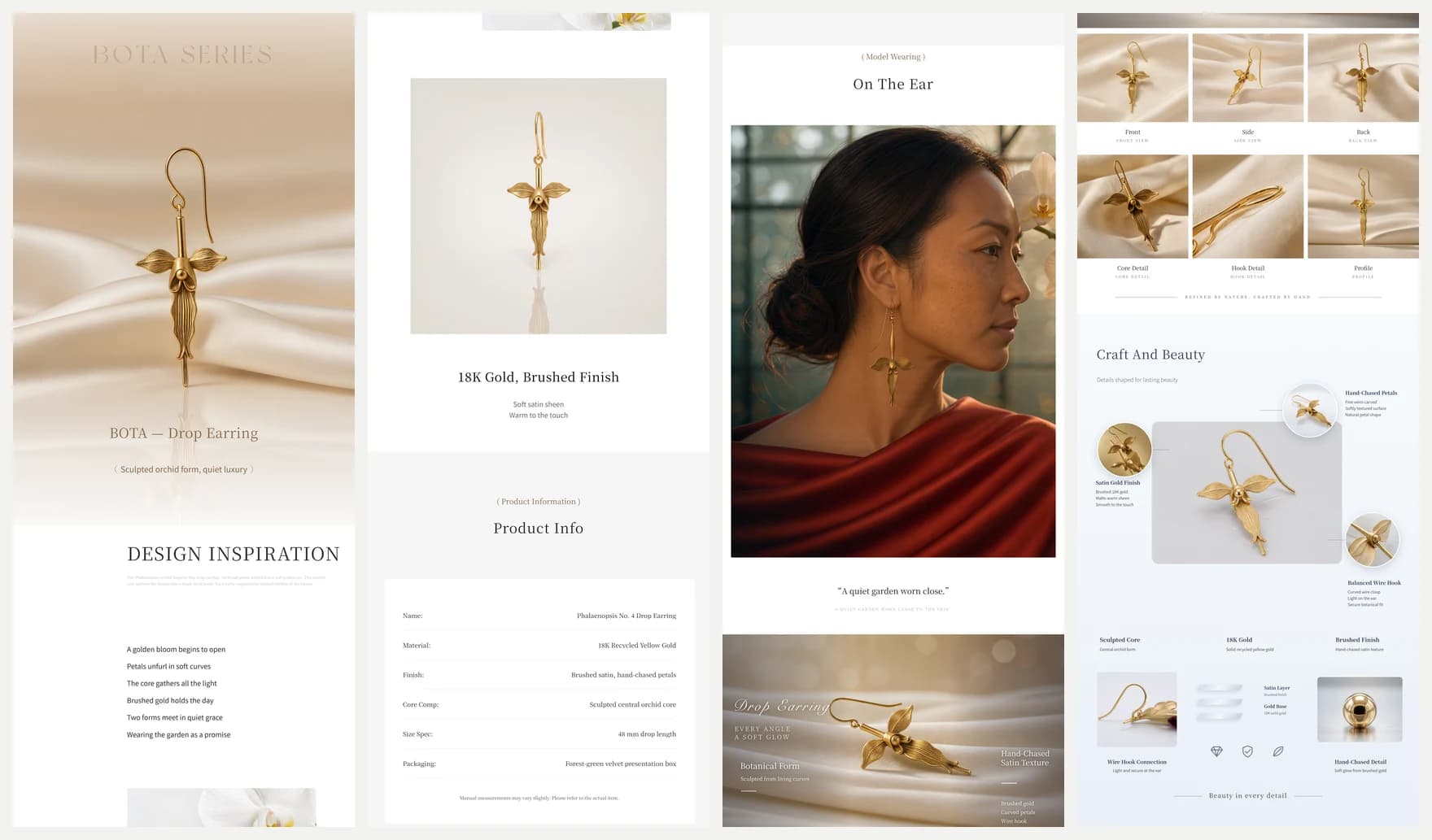
Read as MarkdownStandard image APIs break down as soon as you ask for a full scrolling ecommerce product detail page or a multi-section landing page mockup. Aspect ratios top out around 9:16 or 21:9, typography drifts between stitched slices, and stitching separate banners together leaves visible seams. Kling Image 4.0 Long Image (kling-image-4-0-long-image) solves that exact workflow by rendering an entire vertical layout as one coherent tall PNG from a single POST /v1/images/generations call.
Unlike Kling Image 4.0, which outputs 2K or 4K discrete stills and multi-frame series, the Long Image endpoint is built around two specialized layout skills—ecommerce and webpage—each with its own reference-image types, length controls, and tiered pricing. As of late November 2026, most search results still mix this model up with Kling video or generic image upscalers. This guide lays out the verified API contract, every pricing tier, real validation rules, and the production engineering details you need to handle multi-minute renders and 50 MB+ PNG downloads cleanly.
Two skills, two strict input contracts
Every request to kling-image-4-0-long-image must declare settings.skill as either ecommerce or webpage. Mixing reference types between the two modes returns an HTTP 400 validation error before billing.
| Field / rule | skill: "ecommerce" | skill: "webpage" |
|---|---|---|
| Primary deliverable | Vertical product detail page (PDP) | Full scrolling webpage visual design |
| Reference item types | refer_image (required: 1 to 3 photos) | style_refer_image (0–1) and subject_refer_image (0–1) |
| Zero-reference text-only calls | Rejected (HTTP 400) | Allowed |
settings.length | short (~2–5 sections), medium (default, ~6–10), long (~11–18) | Ignored (omit) |
settings.resolution | 1k (1024 px wide, default) or 2k (2048 px wide) | 1k (1024 px wide, default) or 2k (2048 px wide) |
4k resolution | Not supported (HTTP 400) | Not supported (HTTP 400) |
| Output count | Always 1 tall PNG (output.data[0].url) | Always 1 tall PNG (output.data[0].url) |
Every reference image URL must be a publicly accessible HTTP(S) JPEG or PNG up to 30 MB, at least 300 pixels on each side, with a width-to-height ratio between 2:5 and 5:2. Note that element references are not supported on kling-image-4-0-long-image.
Prompt capacity is unusually generous compared to standard image generators: up to 166,000 English characters or 71,000 non-English characters (mixed prompts must satisfy english / 166000 + non_english / 71000 <= 1). That headroom exists so you can supply full section-by-section copy, verified specification tables, ingredient lists, and callout labels instead of letting the model invent product claims.
Live pricing tiers and reference-image math
Each completed Long Image task bills one flat tier rate—determined by skill, resolution, and (for ecommerce) length—plus one reference-image fee for every input photo, starting from the first image. Failed or invalid requests carry no charge.
What Kling Image 4.0 Long Image costs
| Category | Pricing (USD) |
|---|---|
| Ecommerce · 1K · short | $0.2269 |
| Ecommerce · 2K · short | $0.2723 |
| Ecommerce · 1K · medium | $0.4538 |
| Ecommerce · 2K · medium | $0.5294 |
| Ecommerce · 1K · long | $0.7563 |
| Ecommerce · 2K · long | $0.8319 |
| Webpage · 1K | $0.5294 |
| Webpage · 2K | $0.5748 |
| Reference image | $0.003025 |
On https://api.toklab.ai/v1/pricing (checked November 20, 2026), the eight output tiers break down as follows, with every input reference image adding $0.003025:
| Skill | Length | Resolution | Output rate | Example with 2 references |
|---|---|---|---|---|
ecommerce | short (~2–5 sections) | 1k | $0.2269 | $0.23295 |
ecommerce | short (~2–5 sections) | 2k | $0.2723 | $0.27835 |
ecommerce | medium (~6–10 sections) | 1k | $0.4538 | $0.45985 |
ecommerce | medium (~6–10 sections) | 2k | $0.5294 | $0.53545 |
ecommerce | long (~11–18 sections) | 1k | $0.7563 | $0.76235 |
ecommerce | long (~11–18 sections) | 2k | $0.8319 | $0.83795 |
webpage | n/a | 1k | $0.5294 | $0.53545 |
webpage | n/a | 2k | $0.5748 | $0.58085 |
Look closely at the 1K-to-2K jump: upgrading from 1k to 2k adds only $0.0454 on webpage (+8.6%) and $0.0756 on ecommerce medium or long (+10% to +16.7%). Because tall pages pack small UI labels, spec grids, and body copy, 2k (2048 px wide) is almost always worth the small premium for final assets, while 1k works well for cheap structural drafts before locking the section outline.
Structuring prompts for ecommerce vs webpage runs
Because the model composes an entire scrolling page in one pass, vague prompts produce repetitive filler sections or hallucinated specs. Treating the prompt like a wireframe specification produces dramatically cleaner layouts:
- List sections in exact top-to-bottom order. Number each band explicitly—for example:
Section 1: Hero banner,Section 2: 3-column feature callouts,Section 3: Macro texture detail,Section 4: Specification table,Section 5: Care instructions and footer. - Anchor each reference photo with
@id. Inecommercemode, assign clear IDs (front,spout,box) and tell the model which band should feature which angle. Inwebpagemode, separate look-and-feel (@layoutviastyle_refer_image) from the hero object (@productviasubject_refer_image). - Supply exact copy and numbers. Never write "add realistic technical specifications." Provide the exact wattage, dimensions, materials, and headlines you want rendered so you do not have to retouch invented figures later.
- Match
settings.lengthto your section count. Asking for 14 detailed bands insidelength: "short"compresses typography until small labels blur. Pair 2–5 bands withshort, 6–10 withmedium, and 11–18 withlong.
Choosing the right ecommerce length tier
Picking between short, medium, and long is both a visual pacing decision and a budget lever. A short page (~2–5 sections, $0.2269 at 1k or $0.2723 at 2k) fits single-SKU promotional cards, mobile-first marketplace teasers, and comparison strips where the buyer only needs a hero shot, three selling points, and one compact spec block. A medium page (~6–10 sections, $0.4538 at 1k or $0.5294 at 2k) is the practical sweet spot for most Shopify, Amazon A+, and cross-border storefront detail pages: it gives enough vertical space for a hero visual, close-up material shots, usage scenes, a dimension table, and box contents without stretching the narrative thin.
Reserve long (~11–18 sections, $0.7563 at 1k or $0.8319 at 2k) for flagship electronics, appliances, or multi-variant kits that genuinely require storytelling bands, exploded component callouts, step-by-step usage guides, certification badges, and FAQ blocks. When you do not have enough distinct product facts to fill eleven or more sections, long mode tends to repeat earlier angles or invent generic lifestyle banners, wasting both render time and budget.
Why webpage mode splits style and subject references
In webpage mode, separating style_refer_image from subject_refer_image prevents a classic failure mode of single-bucket reference APIs: the model copying the wrong brand's product into your layout, or copying your product photo's cluttered background into the site's UI chrome. Passing an editorial screenshot or Figma frame as style_refer_image restricts it to grid rhythm, color tokens, typography hierarchy, and button styling, while passing a clean studio product shot as subject_refer_image keeps the physical object faithful across the hero and feature cards. If you want an original art direction from text alone, omit both image fields and describe the palette, font pairing, and grid structure directly in the prompt.
Quality assurance before publishing generated pages
Even at 2k resolution, generated long images should pass a quick automated and visual QA gate before going live on a storefront or client deck. First, inspect every rendered number, unit, and ingredient line against your source prompt—small typographic slips in dense specification tables are much easier to catch at 100% zoom than in a scaled-down preview. Second, verify that the product's physical geometry (button placement, logos, ports, and proportions) stayed consistent from the hero band down to the close-up sections. Third, check vertical legibility on a 390 px mobile viewport after slicing: a desktop-dense 4-column feature row that looks sharp at 2,048 px wide can become unreadable on a phone screen unless you prompt for bold, high-contrast 2-column or stacked mobile cards.
Complete request examples for both skills
1. Ecommerce product detail page (medium, 2k)
{
  "model": "kling-image-4-0-long-image",
  "contents": [
    {"type": "refer_image", "url": "https://example.com/kettle-front.png", "id": "front"},
    {"type": "refer_image", "url": "https://example.com/kettle-spout.jpg", "id": "spout"},
    {
      "type": "prompt",
      "text": "Design a clean ecommerce product detail page for the matte black gooseneck kettle in @front. Section 1: Hero banner with headline 'Precision Pour 0.9L' and @front centered on warm stone. Section 2: Three feature cards covering 1200W rapid boil, 1-degree PID control, and 60-minute hold. Section 3: Macro close-up based on @spout highlighting laminar flow control. Section 4: Lifestyle pour-over brewing scene. Section 5: Dimension and electrical spec table (900 ml, 1200W, 120V, 304 stainless steel). Section 6: Box contents and care notes."
    }
  ],
  "settings": {
    "skill": "ecommerce",
    "length": "medium",
    "resolution": "2k"
  }
}
2. Webpage visual design with style + subject references (2k)
import os
import time
import requests

API_KEY = os.environ["TOKLAB_API_KEY"]
HEADERS = {
    "Authorization": f"Bearer {API_KEY}",
    "Content-Type": "application/json",
}

payload = {
    "model": "kling-image-4-0-long-image",
    "contents": [
        {"type": "style_refer_image", "url": "https://example.com/editorial-grid.png", "id": "grid"},
        {"type": "subject_refer_image", "url": "https://example.com/chronograph.jpg", "id": "watch"},
        {
            "type": "prompt",
            "text": (
                "Create a vertical product launch webpage adopting the Swiss editorial grid, "
                "high-contrast serif headings, and generous whitespace of @grid while featuring @watch. "
                "Include: top navigation bar, full-bleed hero with @watch, three-card movement breakdown, "
                "water-resistance specification band, and minimalist footer."
            ),
        },
    ],
    "settings": {"skill": "webpage", "resolution": "2k"},
}

resp = requests.post(
    "https://api.toklab.ai/v1/images/generations",
    headers=HEADERS,
    json=payload,
    timeout=60,
)
resp.raise_for_status()
task_id = resp.json()["id"]

# Poll every 5s; long 2K layouts can take several minutes.
deadline = time.time() + 600
while time.time() < deadline:
    status_resp = requests.get(
        f"https://api.toklab.ai/v1/tasks/{task_id}",
        headers={"Authorization": f"Bearer {API_KEY}"},
        timeout=30,
    )
    status_resp.raise_for_status()
    data = status_resp.json()
    if data.get("status") == "completed":
        png_url = data["output"]["data"][0]["url"]
        print("Ready:", png_url)
        break
    if data.get("status") == "failed":
        raise RuntimeError(f"Long image task failed: {data}")
    time.sleep(5)
Production engineering notes: timeouts, 50 MB+ PNGs, and slicing
Integrating kling-image-4-0-long-image into a backend service differs from integrating a fast 1024×1024 image generator in three operational ways:
- Plan for multi-minute task latency. A
long+2kecommerce render routinely takes several minutes. Do not hold an HTTP request open from a browser or serverless function with a 30-second timeout; enqueue the task ID in a background worker and pollGET /v1/tasks/:idwith a 10-minute ceiling. - Stream large PNG downloads. Because a
2klong image is 2,048 pixels wide and can span 10,000 to 20,000+ pixels vertically, finished PNG files can exceed 50 MB. Use streamed downloads (requests.get(url, stream=True)) with generous read timeouts and avoid buffering multiple raw bitmaps in memory inside a small container. - Slice and re-encode for live storefronts. Marketplace platforms (Shopify, Amazon A+, Taobao/Tmall) and mobile browsers penalize single 50 MB PNGs. After verifying the generated layout, slice the master PNG along section boundaries and convert each slice to WebP or progressive JPEG at 80–85% quality for fast storefront delivery.
Common HTTP 400 errors to guard against
Validate these five conditions before calling the endpoint:
- Missing
settings.skill(must be"ecommerce"or"webpage"). skill: "ecommerce"with zerorefer_imageitems or more than three.- Passing
refer_imageinwebpagemode, orstyle_refer_image/subject_refer_imageinecommercemode. - Requesting
resolution: "4k"(only"1k"and"2k"exist for Long Image). - Reusing the same
idstring across two reference items incontents.
If your workflow needs standard horizontal or square campaign shots, product lifestyle sets, or up to 10 reference images in one frame, route those jobs to Kling Image 4.0 instead and reserve Kling Image 4.0 Long Image for vertical multi-band page compositions.
Sources
- TokLab Kling Image 4.0 Long Image Model Page — Interactive Playground, live 1K/2K tier table, and calculator.
- TokLab Kling Image 4.0 Long Image API Reference — Official schema, character limits, and validation constraints.
- TokLab Live Pricing API — Machine-readable rate feed checked November 20, 2026.