GPT Image 2.6 pricing: same token rate, very different cost per image
GPT Image 2.6 costs the same per token as 2.5, but a low-quality image uses 4.2 times the tokens. Cost per image at five sizes, checked against our own bills.
Read as MarkdownOpenAI released GPT Image 2.6 on November 4, 2026, as two API models, Flare and Sunburst. Its rate card matches GPT Image 2.5 line for line: $30 per million image output tokens, $8 per million image input tokens and $5 per million text input tokens (OpenAI pricing, checked November 5, 2026).
That makes it easy to assume an image costs the same on both. It doesn't. OpenAI's own cost calculator gives GPT Image 2.6 more output tokens per image at low and medium quality: 4.2 times as many at low and 3.3 times at medium. From high quality up, the counts are identical.
A day after launch, search engines hadn't caught up. On November 5, Google's AI Overview for "gpt image 2.6 pricing" said OpenAI had not published a price, mixed the model up with Microsoft's MAI-Image-2.6, and quoted a Batch discount that GPT Image 2.6 doesn't have.
We read the calculator's code, ran its formula against eight GPT Image 2.5 renders from our own billing ledger, and got the exact token count every time. So the GPT Image 2.6 numbers below come from the same formula OpenAI uses, and the 2.5 side of every comparison has been checked against real bills.
What OpenAI charges for GPT Image 2.6
GPT Image 2.6 is billed by token, and both models share one rate card:
| Token type | gpt-image-2.6-flare | gpt-image-2.6-sunburst | Cached |
|---|---|---|---|
| Image output | $30 / 1M | $30 / 1M | n/a |
| Image input | $8 / 1M | $8 / 1M | $2 / 1M |
| Text input | $5 / 1M | $5 / 1M | $1.25 / 1M |
Source: OpenAI API pricing and the Flare and Sunburst model pages, checked November 5, 2026.
Three details on those pages matter for the bill. Flare and Sunburst cost exactly the same, so picking Sunburst for detail doesn't raise the rate. Neither model supports the Batch API, while GPT Image 2.5 still gets Batch at half price ($15 per million output tokens). And the new complexity setting, which controls how much the model plans before it renders, has no separate fee.
How OpenAI counts the tokens in one image
Image output is where the money goes, and the number of output tokens depends on three things: the quality level, the width and the height. OpenAI publishes the formula as an interactive calculator in its image generation guide. The page only shows the answer, so we read the calculator's code.
Each quality level starts from a base grid size: 16 for low, 24 for medium, 48 for high, 64 for xhigh and 96 for max. The calculator scales that grid to the image's aspect ratio, multiplies the two sides, and adjusts for the total pixel count. For GPT Image 2.5, that's the answer. For GPT Image 2.6, the calculator takes one more step and multiplies the result by a per-quality factor:
| Quality | Factor applied to GPT Image 2.6 |
|---|---|
| low | 4.2 |
| medium | 3.3 |
| high | 1 |
| xhigh | 1 |
| max | 1 |
Source: GptImageTokenCalculator on developers.openai.com, read November 5, 2026.
The guide's text points the same way without giving the numbers: "The models can use different token counts for the same quality setting and share the same price per image output token." OpenAI doesn't say why the low tiers changed.
We checked the formula against our own bills
A formula pulled from a web page is only as good as its match with real invoices. We had eight GPT Image 2.5 renders with logged token counts, so we ran each one through the calculator's formula:
| Render | Date | Size | Quality | Formula | Billed |
|---|---|---|---|---|---|
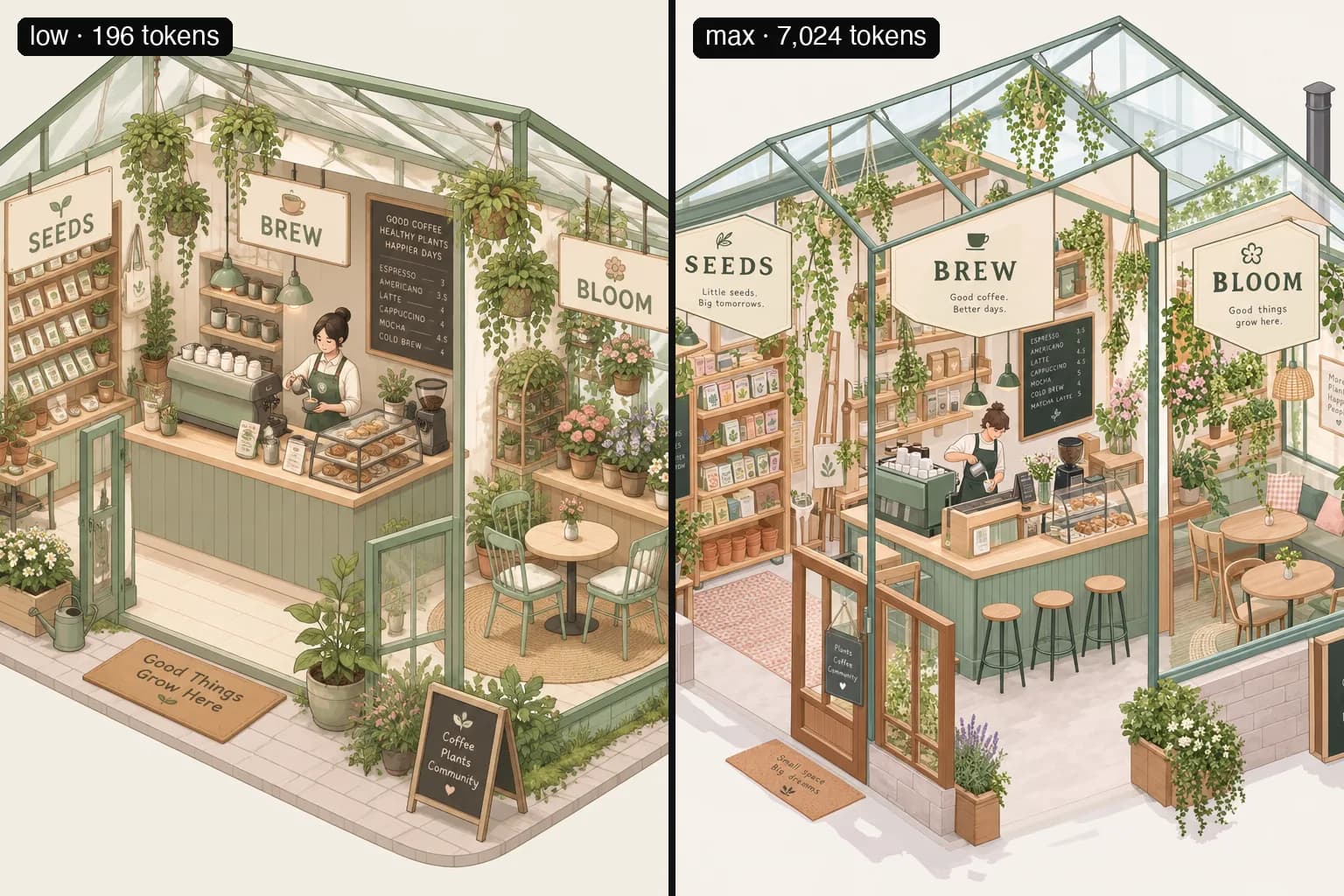
| Pricing test, Flare | Nov 2 | 1024×1024 | low | 196 | 196 |
| Pricing test, Flare | Nov 2 | 1024×1024 | medium | 439 | 439 |
| Pricing test, Flare | Nov 2 | 1024×1024 | high | 1,756 | 1,756 |
| Pricing test, Flare | Nov 2 | 1024×1024 | xhigh | 3,122 | 3,122 |
| Pricing test, Flare | Nov 2 | 1024×1024 | max | 7,024 | 7,024 |
| Catalogue cover, Flare | Nov 5 | 1536×1024 | low | 158 | 158 |
| Catalogue cover, Flare (redraw) | Nov 5 | 1536×1024 | low | 158 | 158 |
| This post's cover, Flare | Nov 5 | 1536×1024 | high | 1,372 | 1,372 |
Source: renders on TokLab. The November 2 counts are from our GPT Image 2.5 pricing test; the November 5 counts are from the usage field of three gpt-image-2.5-flare-official tasks.
Eight renders, eight exact matches, across two sizes and all five quality levels. GPT Image 2.6 wasn't on TokLab when we ran these, so its column below is OpenAI's formula, not our ledger. Given how closely the formula tracks real 2.5 bills, we'd expect 2.6 invoices to match it too.
GPT Image 2.6 cost per image at five sizes
These are output-token costs at $30 per million. A short prompt adds very little on top: 50 text tokens cost $0.00025.
| Size | Quality | GPT Image 2.5 | GPT Image 2.6 | Change |
|---|---|---|---|---|
| 1024×1024 | low | $0.0059 | $0.0247 | 4.2× |
| 1024×1024 | medium | $0.0132 | $0.0435 | 3.3× |
| 1024×1024 | high | $0.0527 | $0.0527 | same |
| 1024×1024 | xhigh | $0.0937 | $0.0937 | same |
| 1024×1024 | max | $0.2107 | $0.2107 | same |
| 1536×1024 or 1024×1536 | low | $0.0047 | $0.0199 | 4.2× |
| 1536×1024 or 1024×1536 | medium | $0.0103 | $0.0340 | 3.3× |
| 1536×1024 or 1024×1536 | high | $0.0412 | $0.0412 | same |
| 2048×2048 | low | $0.0119 | $0.0500 | 4.2× |
| 2048×2048 | medium | $0.0268 | $0.0883 | 3.3× |
| 2048×2048 | high | $0.1070 | $0.1070 | same |
| 3840×2160 | low | $0.0111 | $0.0467 | 4.2× |
| 3840×2160 | medium | $0.0260 | $0.0857 | 3.3× |
| 3840×2160 | high | $0.1001 | $0.1001 | same |
Source: OpenAI's calculator formula and OpenAI list prices, November 5, 2026. GPT Image 2.5 rows match our billed renders where we have them. The calculator applies the same size rules to both models: edges up to 3,840 px and 655,360 to 8,294,400 pixels in total.
Three patterns stand out:
- Low is no longer the bargain tier. A 1024×1024 low image on GPT Image 2.6 costs $0.0247. That's almost twice a medium image on GPT Image 2.5 ($0.0132).
- Medium sits close to high. On GPT Image 2.6, high costs 21% more than medium at 1024×1024 ($0.0527 vs $0.0435). On GPT Image 2.5, high cost four times as much as medium.
- From high up, nothing changes. High, xhigh and max use the same token counts on both versions, so moving finished, high-quality work to GPT Image 2.6 doesn't change what an image costs.
The first pattern is the one that hurts. If your pipeline drafts ten images at low and keeps one, the drafts were the cheap part of the job on 2.5. On 2.6 they aren't.
One quirk carries over from 2.5: a wide or tall 1536×1024 image uses fewer tokens than a 1024×1024 square, even though it has 50% more pixels. The grid shrinks on the short side.
What else goes on the bill
Output tokens are most of the cost, but not all of it. Every image you send to /v1/images/edits is billed as image input at $8 per million tokens. The new markup layer, a transparent PNG that marks where to edit, is billed like any other edit, and OpenAI says it carries no extra fee.
SVG output is billed twice. OpenAI renders a reference image first and then writes the SVG from it, so you pay the image rate for the reference image plus the authoring model's rate for the tokens it uses to write the file. That second part depends on the drawing, so test one logo before you budget fifty.
Animated GIFs are the gap in the docs. OpenAI's pricing pages don't say how frames are counted. Generate one GIF with a small frame_count, read the usage field in the response, and scale from there.
If you stream regular images, each partial image adds 100 output tokens. GIF and SVG output can't stream, so they never pick up that charge.
Calculate it yourself
The calculator lives on OpenAI's page, but you can run the same math in your own budget sheet or job queue. This Python function reproduces it, including the GPT Image 2.6 factors and JavaScript's rounding:
import math

BASE = {"low": 16, "medium": 24, "high": 48, "xhigh": 64, "max": 96}
GPT_IMAGE_2_6_FACTOR = {"low": 4.2, "medium": 3.3, "high": 1, "xhigh": 1, "max": 1}

def js_round(x):
    return math.floor(x + 0.5)

def output_tokens(model, width, height, quality):
    long_side, short_side = max(width, height), min(width, height)
    base = BASE[quality]
    scaled = base / (long_side / short_side)
    floor = math.floor(scaled)
    short_grid = floor + floor % 2 if scaled - floor == 0.5 else js_round(scaled)
    cells = (base * short_grid) if width >= height else (short_grid * base)
    tokens = math.ceil(cells * (2_000_000 + width * height) / 4_000_000)
    if model == "gpt-image-2.6":
        tokens = js_round(tokens * GPT_IMAGE_2_6_FACTOR[quality])
    return tokens

def output_cost(model, width, height, quality, usd_per_million=30):
    return output_tokens(model, width, height, quality) * usd_per_million / 1_000_000

print(output_tokens("gpt-image-2.6", 1024, 1024, "low"))        # 823
print(round(output_cost("gpt-image-2.6", 1024, 1024, "low"), 5))  # 0.02469
Use explicit sizes and quality levels. With quality: "auto" or size: "auto", the model picks after it reads the prompt, so no formula can predict the count ahead of time.
Which quality to use when cost matters
| If you | Do this |
|---|---|
| Run drafts at low on GPT Image 2.5 | Expect each draft to cost 4.2 times as much on 2.6, or keep drafting on 2.5 |
| Use medium for production | Compare medium against high on 2.6: high is only 21% more |
| Ship finals at high, xhigh or max | Move to 2.6 without a per-image cost change |
| Run large jobs through the Batch API | Stay on GPT Image 2.5 for those jobs; 2.6 has no Batch pricing |
| Need logos or icons as SVG | Run one test call and read usage before you plan volume |
Where you can run GPT Image 2.6 today
OpenAI's own API serves gpt-image-2.6-flare and gpt-image-2.6-sunburst on the generations and edits endpoints. OpenAI may ask you to verify your organization before you can use GPT Image models.
OpenRouter listed both models on November 5 with image output at $30 per million tokens, the same as OpenAI's rate.
TokLab serves GPT Image 2.6 too. gpt-image-2.6-flare and gpt-image-2.6-sunburst cost a flat amount per image, and their -official versions are billed by the token, using the same formula as above at TokLab's own rates. The GPT Image 2.6 page has live prices and a Playground, and failed renders are not charged.
Questions people ask
How much does GPT Image 2.6 cost per image? At 1024×1024, output costs about $0.025 at low, $0.043 at medium, $0.053 at high and $0.21 at max, on OpenAI's list prices. Larger sizes cost more, and wide or tall 1536×1024 images cost a little less than squares.
Why is GPT Image 2.6 more expensive than GPT Image 2.5? It isn't per token. Per image, OpenAI's calculator counts 4.2 times the output tokens at low and 3.3 times at medium. OpenAI hasn't explained the change. High quality and above cost the same on both.
Is GPT Image 2.6 free? Not in the API, where every image is billed by token. In ChatGPT and Codex, OpenAI says Images 2.6 is available across all subscription tiers, and the API token prices don't apply there.
Does GPT Image 2.6 work with the Batch API? No. OpenAI's model pages list Batch as not supported for both Flare and Sunburst. GPT Image 2.5 still has Batch pricing at half the standard rate.
Before you switch, price GPT Image 2.6 by the quality you actually ship, not by its per-token rate. To compare against what you pay now, run your usual prompt on GPT Image 2.6 and GPT Image 2.5 in the TokLab Playground and compare the two bills in your usage history.