Best AI image editor in 2026: 4 models, 5 everyday edits, measured
Four AI image editors got the same five prompt edits: a recolor, a price change, a new background, new light and new clothes. What each changed, and the cost.
Read as MarkdownEditing a photo by typing what you want changed is now the normal way to use an AI image editor. "Make the mug orange." "Change the price to $3.90." "Put her in a yellow raincoat." The hard part isn't the change you asked for. It's everything the editor changes that you didn't ask for.
To see how much that varies, we gave four AI image editing models the same five edits on November 4, 2026, from a simple recolor to swapping someone's clothes. Each result also got a number for how much of the rest of the picture moved. All 20 edits cost $0.57861 together.
The four models are the ones behind the apps most people use for this: Nano Banana Pro in Gemini, GPT Image 2.5 in ChatGPT, Seedream 5.0 Pro in Dreamina, and FLUX 3 Image Klein from Black Forest Labs. We make TokLab, which sells all four, and the edits ran through its API.
The short answer
| If your edit is… | Use | Why |
|---|---|---|
| a colour change on one object | FLUX 3 Image Klein | changed only the mug, for under a cent |
| text in the photo, such as a price | Seedream 5.0 Pro | kept the original chalk lettering style |
| a new background behind a product | GPT Image 2.5 | kept the mug's shape, glaze and position |
| new light or time of day | Seedream 5.0 Pro or FLUX 3 Image Klein | changed the light, kept her face and framing |
| new clothes on a person | FLUX 3 Image Klein or Seedream 5.0 Pro | swapped the shirt, left the face and street alone |
On the Artificial Analysis image editing leaderboard, where viewers vote between edits, GPT Image 2.5 Sunburst at max quality ranks first at 1199. Seedream 5.0 Pro scores 1129, Nano Banana Pro 1109 and FLUX 3 Image Klein 1072. Our five edits rank them differently, and the sections below show why.
How the test worked
We used three images. The mug and the chalkboard came out of our AI image generator test, made there by Seedream 5.0 Pro and Nano Banana Pro. The portrait is the rainy-street photo from our image to video test. Each model got each image with one plain-English instruction at its default settings (GPT Image 2.5 at high quality). Each edit rendered once and we kept that result; one Seedream request failed before rendering, without a charge, and was sent again.
To put a number on "keep everything else the same", we resized each result to the original's size and compared the two pixel by pixel in the parts of the picture the edit shouldn't touch: the table and wall around the mug, the street around the sign, her face and the street beside her. The score is the average change on a 0 to 255 scale. Near 0 means the editor left those areas alone. Above 5 or so, it redrew them.
| Model | Price per edit | Output size |
|---|---|---|
| Nano Banana Pro | $0.01875 | same size as the input |
| GPT Image 2.5 | $0.021 | 1024×1024, even for the 3:2 portrait |
| Seedream 5.0 Pro | $0.0675 | twice the input's width and height |
| FLUX 3 Image Klein | $0.008472 | about the input size |
Source: what TokLab billed per edit, November 4, 2026. Seedream bills its edits at $0.0675, twice its $0.03375 price for a new image, and returned every edit at twice the input's width and height.
Which is the best AI image editor for each kind of job?
Changing the colour of one object
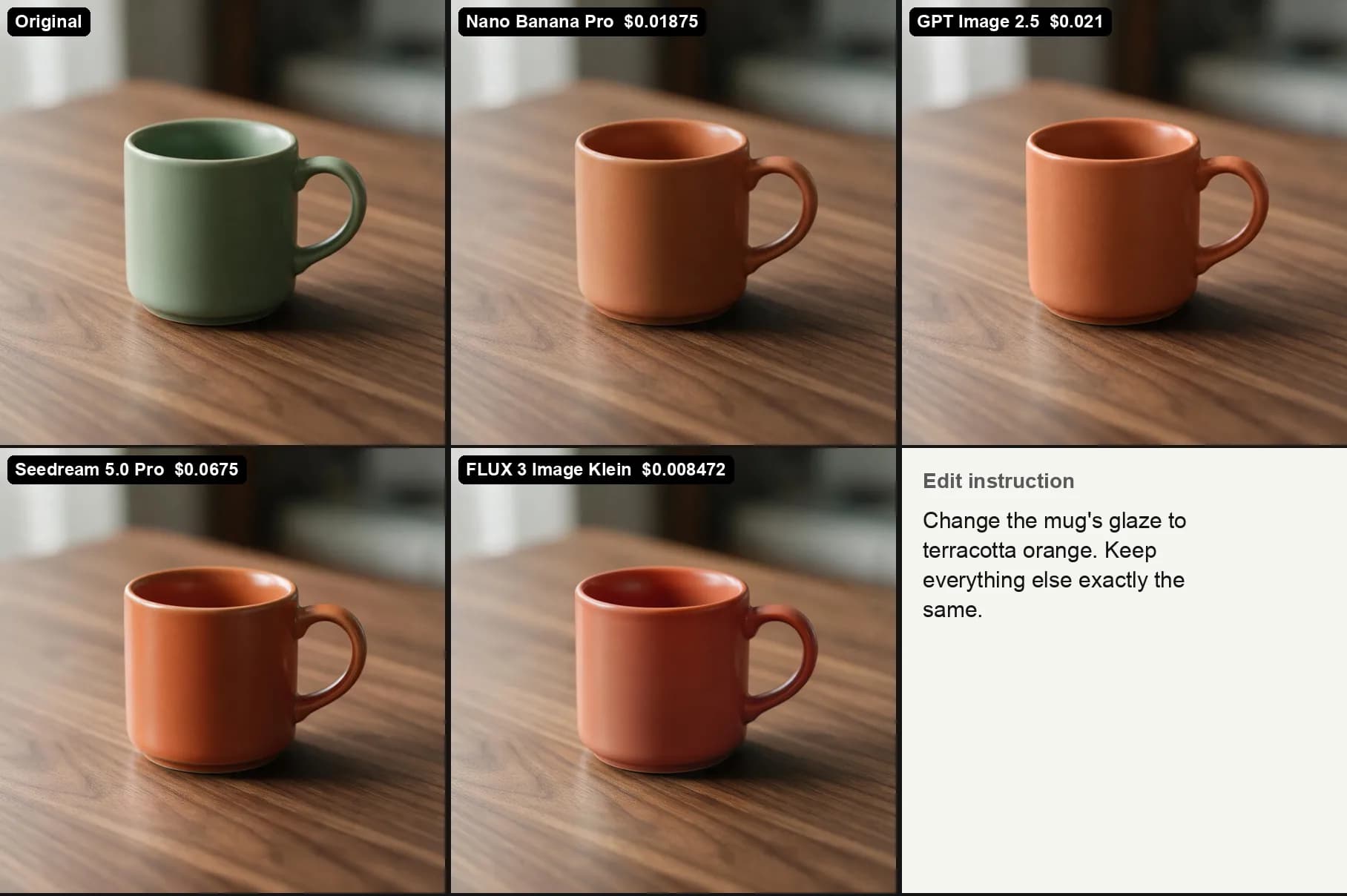
Instruction: "Change the mug's glaze to terracotta orange. Keep everything else exactly the same."
All four got the colour. Look closely and FLUX 3 Image Klein's orange leans redder than the others, but it's the one that touched nothing else: its score outside the mug was 0.1, which means the table and the background are effectively the original pixels. Seedream scored 1.7, GPT Image 2.5 2.0 and Nano Banana Pro 2.7, small enough that you won't see it, large enough to show they re-rendered the whole frame.
For product colourways, this is the cheapest kind of edit to get right. Any of the four will do; FLUX does it for $0.008472.
Changing text in a photo
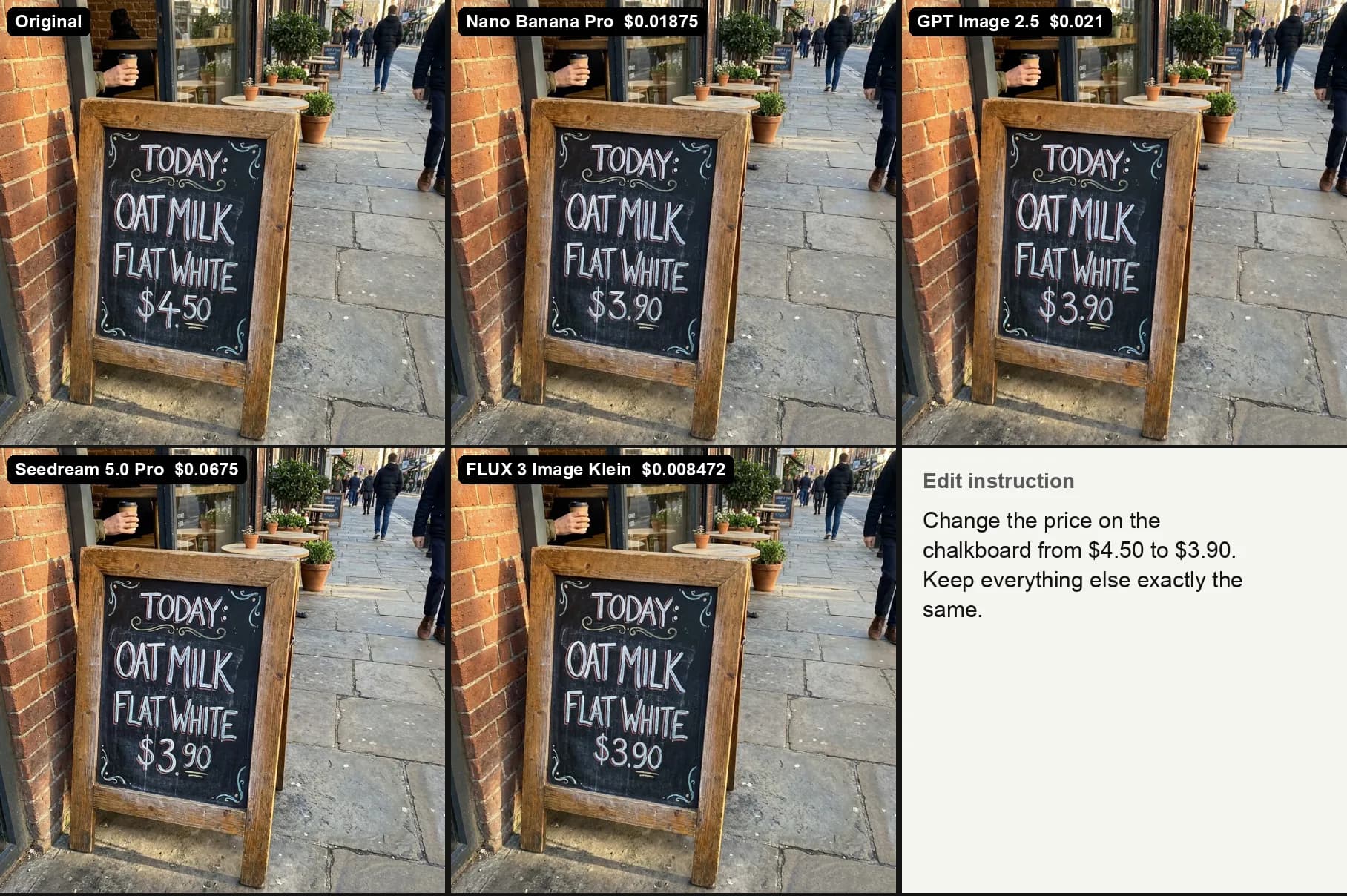
Instruction: "Change the price on the chalkboard from $4.50 to $3.90. Keep everything else exactly the same."
This used to be where AI editing fell apart. All four wrote $3.90 correctly, and none of them touched the words above it.
The difference is in the handwriting. The original price has a large 4 and small raised cents with a line under them. Seedream 5.0 Pro copied that style most closely: big 3, small raised 90, underline. The other three wrote a cleaner $3.90 that still looks chalked, just less like the same hand. FLUX left the rest of the photo almost untouched (0.8). GPT Image 2.5 changed the most around the sign (8.2), redrawing the street slightly.
If the sign is for a real menu, any of these is usable. If it has to look untouched, use Seedream.
Replacing the background behind a product
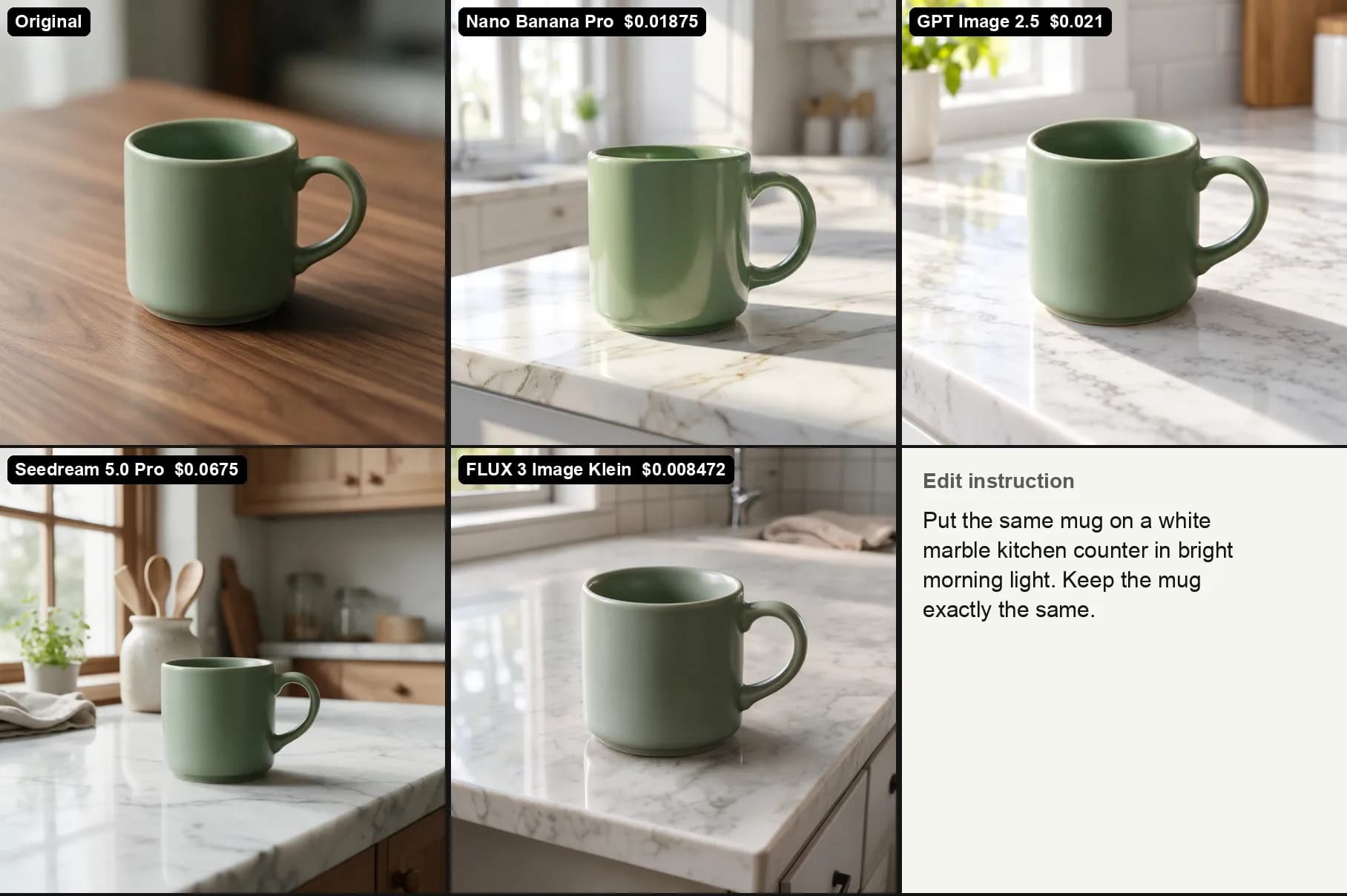
Instruction: "Put the same mug on a white marble kitchen counter in bright morning light. Keep the mug exactly the same."
This is the edit that separated them. GPT Image 2.5 kept the mug's shape, matte glaze and position, and built a white kitchen with a plant and wooden cabinets around it. FLUX 3 Image Klein also kept the mug close to the original, on a marble counter by a window.
Nano Banana Pro changed the mug itself. Its version is taller, a lighter green and glossy, where the original glaze is matte. Seedream 5.0 Pro kept the glaze but shrank the mug and moved it to the right of a full kitchen scene with utensils and a jar. As a kitchen photo it's the most styled of the four; as "the same mug" it isn't.
The pixel scores aren't useful here, because new light falls on the mug in every version. Check this one by eye. For e-commerce, where the product has to match what ships, GPT Image 2.5 was the safest.
Changing the light or time of day
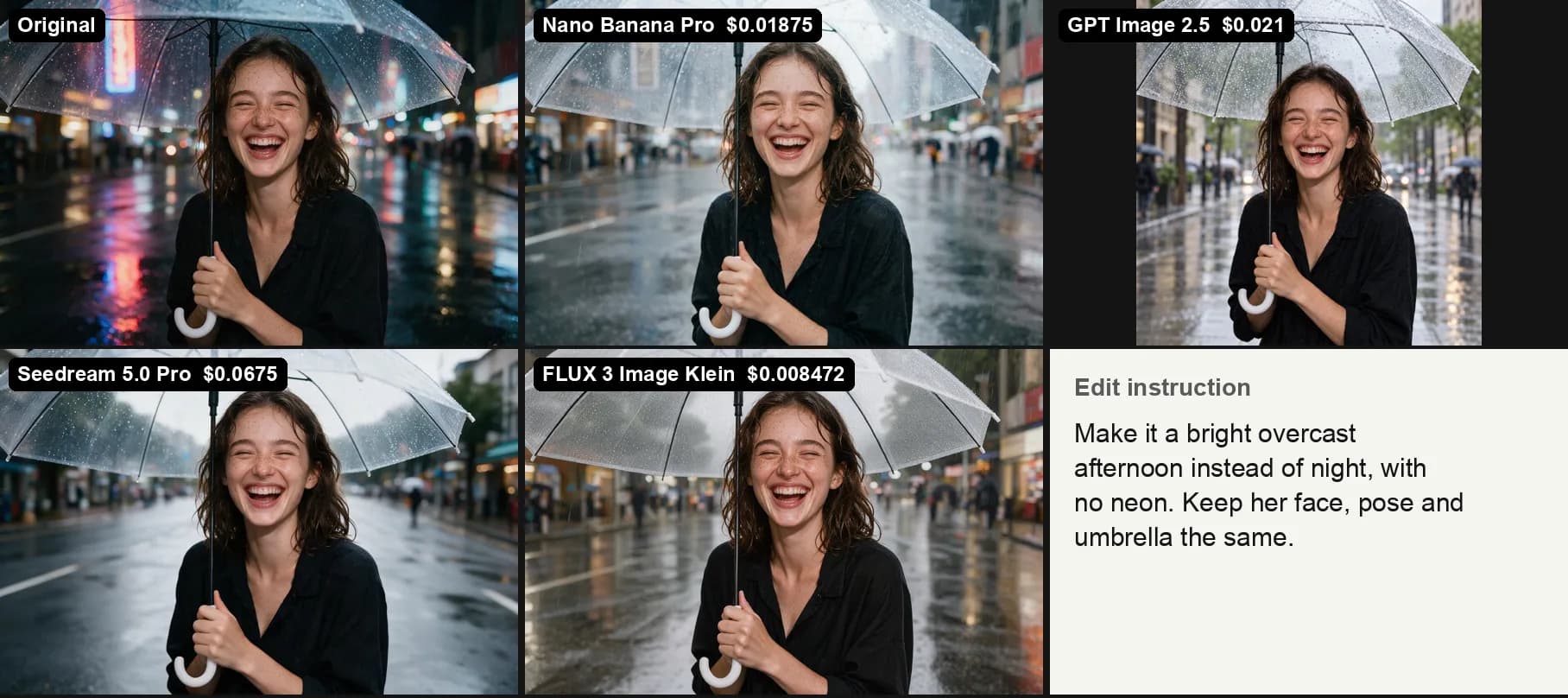
Instruction: "Make it a bright overcast afternoon instead of night, with no neon. Keep her face, pose and umbrella the same."
All four turned night into a grey afternoon and removed the neon signs. Three of them kept her exactly where she was, with the same laugh and the same umbrella. Seedream and FLUX looked the most natural, with soft daylight on wet pavement.
GPT Image 2.5 did something different. Left at its default size of auto, it returned a square image from a 3:2 photo, so it reframed the whole shot. She is closer, the umbrella is larger, and her face has been redrawn. It looks like the same kind of person, but not quite the same one. To keep a 3:2 photo in shape with GPT Image 2.5, set size to 1536x1024.
Seedream's request for this edit failed once before rendering, without a charge, and went through when sent again.
Changing clothes on a person
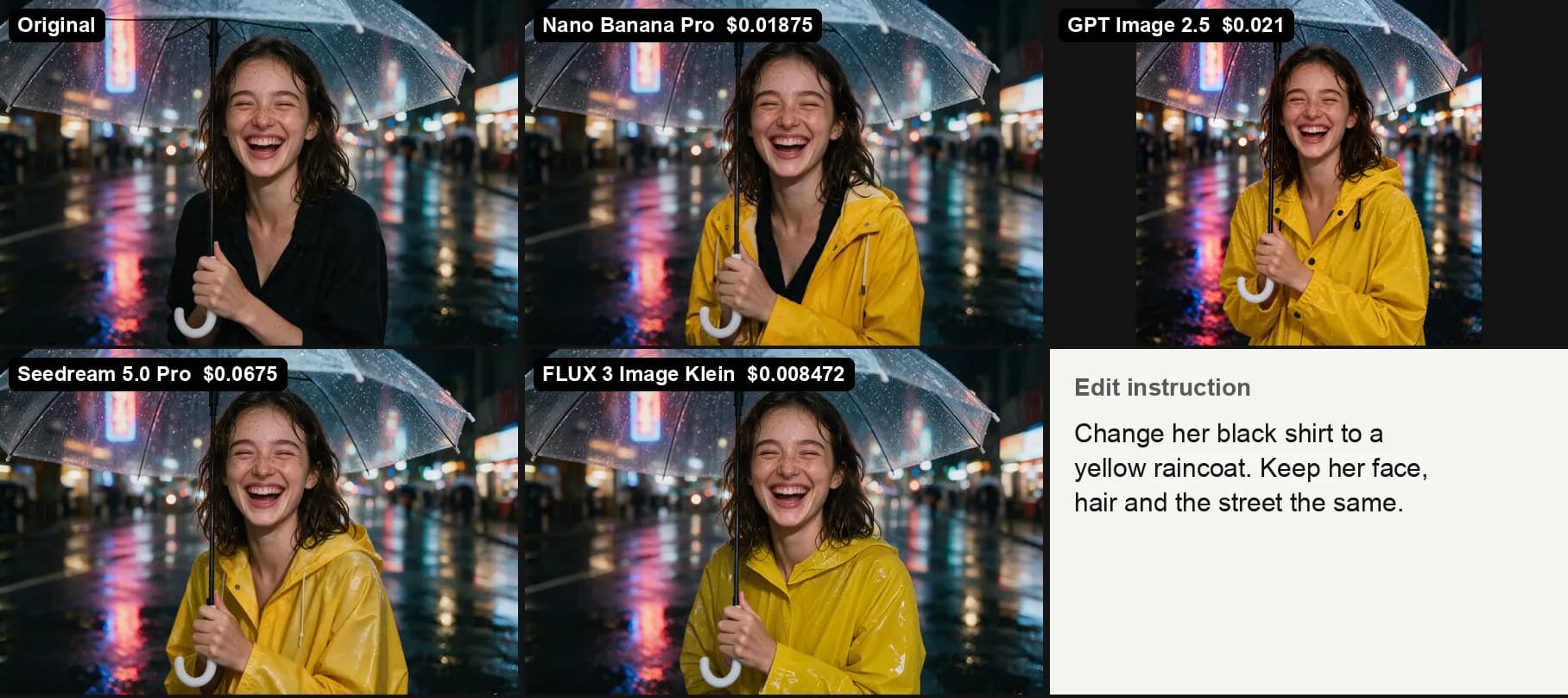
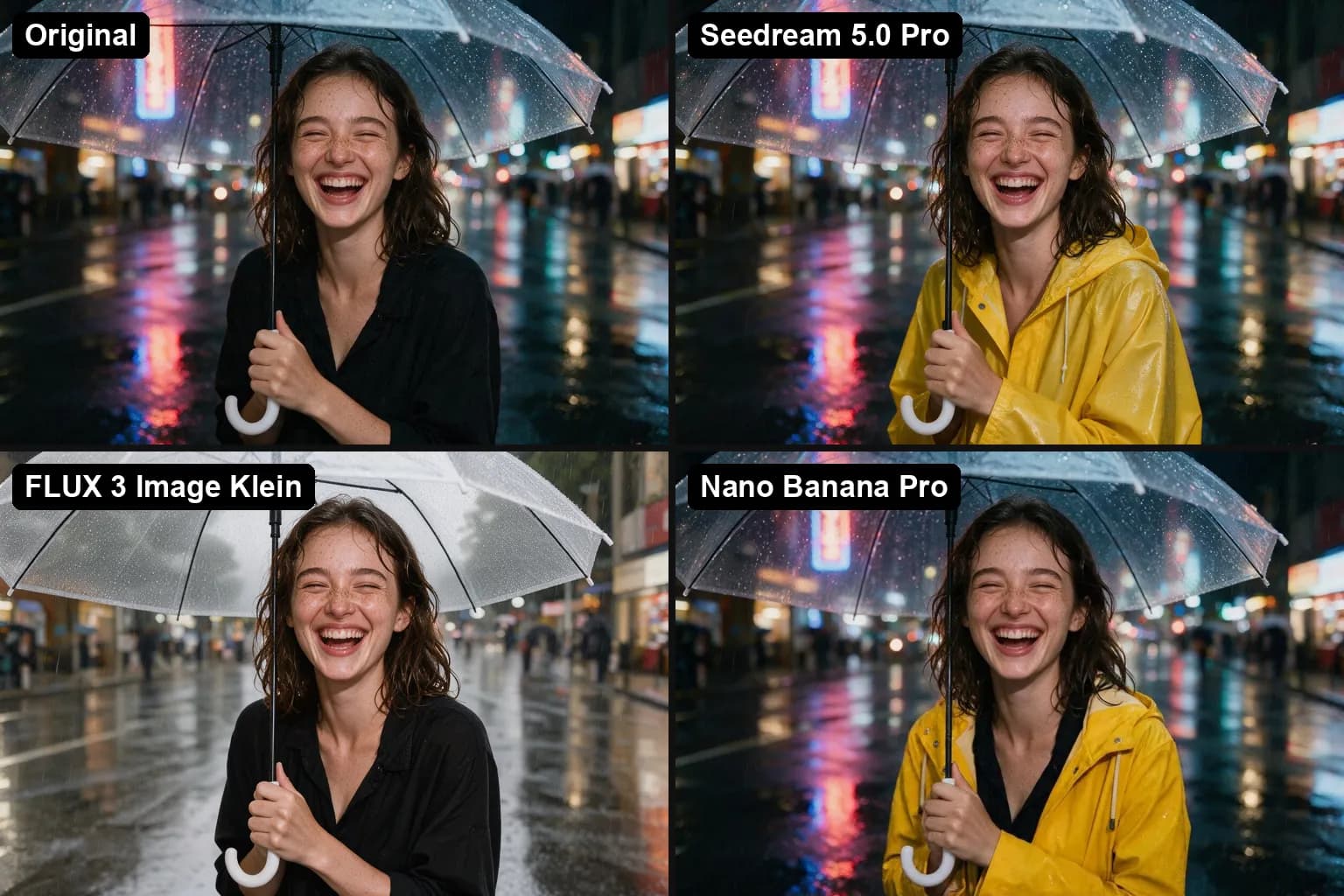
Instruction: "Change her black shirt to a yellow raincoat. Keep her face, hair and the street the same."
Every model put her in a yellow raincoat. They differed in how they read "change her shirt". Seedream 5.0 Pro and FLUX 3 Image Klein replaced it with a hooded raincoat, zipped up. Nano Banana Pro put an open raincoat over the black shirt, which is a reasonable reading but not quite the instruction.
Her face stayed the same on three of them. FLUX's score outside the coat was 1.4, Seedream's 3.7 and Nano Banana Pro's 4.0, and up close all three faces are the original. GPT Image 2.5 again returned a square, reframed image with a redrawn face.
For product try-ons and outfit variations, where the person has to stay the same person, FLUX and Seedream were the two to use.
The four editors behind the apps
You don't need an API to use any of these. Here's where each one lives, and what it costs when you do pay per edit.
Nano Banana Pro is Google's model. In Gemini, paid Google AI plans can run an edit with it through "Redo with Pro"; free Gemini uses Nano Banana 2. It was the most likely of the four to change the thing it was told to keep, as with the glossy mug. $0.01875 an edit.
GPT Image 2.5 is the model behind ChatGPT's image editing, which works in the free plan with limits. No other model here kept a product as intact, but GPT Image 2.5 re-renders the whole picture, and at the default size it squares off anything that isn't square. $0.021 an edit at high quality.
Seedream 5.0 Pro is ByteDance's model, used in its Dreamina app. Of the four, Seedream copied handwriting and lighting most faithfully. It returned every edit at twice the input's width and height and was the most expensive at $0.0675 an edit.
FLUX 3 Image Klein is Black Forest Labs' small model, with open weights you can run yourself. FLUX was the most surgical editor in the test and the cheapest, at $0.008472 an edit, though its colours ran slightly warm.
If you came here looking for an AI app to edit images other than Gemini, as one r/GeminiAI thread put it, the answer depends on the edit: ChatGPT for products, Dreamina for text and portraits, and Black Forest Labs' playground for cheap, precise changes.
AI photo editing apps worth knowing
Most lists of AI image editors are lists of apps, and several of them run the same models tested here. We didn't test these apps; the details are from their pricing pages on November 4, 2026.
Adobe Firefly plans start at US$9.99 a month and include unlimited standard features such as Generative Fill; three of the four plans also include Photoshop on web and mobile. Firefly also offers partner models from Google, OpenAI and Flux.
Photoroom is built for product photos, with AI backgrounds and AI fashion models. Billed yearly, Pro costs $7.50 a month for 8,000 AI credits and 1,000 exports, after a free trial.
Canva puts AI editing inside its design editor. The free plan includes limited AI; Pro costs US$144 a year with ten times as much AI use.
How to test an AI image editor before you pay
- Use your own awkward images. A demo picks photos that edit cleanly. Yours have small text, reflections and faces.
- Write "keep everything else the same", then check it. Put the result next to the original at the same size and flick between them. Anything that shifts, other than your edit, is drift.
- Check the output size. Two of our four models returned a different size than the input. That matters if the image goes back into a layout.
- Look at faces up close. A redrawn face can look fine on its own and still not be the same person.
- Run the same edit twice. Each result here is a single run. A second run can fix a miss or introduce one.
What to check before using an AI edit commercially
Every image Google's models generate carries an invisible watermark. Google's Gemini API documentation says: "All generated images include a SynthID watermark." That doesn't stop you using the image, but it means an edited product photo can be identified as AI-generated.
Also check whose photo you're editing. Changing your own product photos is low risk. Editing a real person's face or clothes, or anything with a brand on it, needs their permission and a look at each app's terms.
FAQ
What is the best free AI image editor?
For prompt-based edits, Gemini and ChatGPT both let you edit images for free with limits, running Nano Banana 2 and GPT Image 2.5. Dreamina offers Seedream with a free tier, and FLUX 3 Image Klein is free to run on your own hardware.
Can AI change the text in a photo?
Yes. All four models in this test changed a chalkboard price from $4.50 to $3.90 correctly on the first try. Seedream 5.0 Pro matched the original handwriting most closely.
Which AI image editor keeps a face the same?
FLUX 3 Image Klein, Seedream 5.0 Pro and Nano Banana Pro kept her face unchanged through a lighting change and an outfit change. GPT Image 2.5 redrew it both times when left at its default size. Current per-edit prices for all four are on the pricing page.