GPT Image 2.6 프롬프트 라이브러리: 실전 템플릿 18종과 API 페이로드
이커머스, UI 목업, 타이포그래피, 다이어그램, 멀티 이미지 편집까지 GPT Image 2.6 Flare·Sunburst용 실전 프롬프트 18개와 비용 가이드를 복사해 쓰세요.
Markdown으로 읽기대부분의 프롬프트 갤러리는 SNS에서는 그럴듯해 보이지만, 제품 디자이너가 읽을 수 있는 패키지 문구, 정확한 16:9 화면비, 기존 스튜디오 사진의 깔끔한 편집을 요구하는 순간 무너지는 한 줄짜리 묘사만 모아 놓습니다. GPT Image 2.6은 다른 습관에 보답합니다. 레이아웃 기하, 조명 물리, 재질 질감, 따옴표로 묶은 텍스트 원문, 그리고 프레임 밖에 남겨 둘 요소를 명시하는 간결한 프로덕션 브리프처럼 프롬프트를 작성할 때 제 성능을 냅니다.
이 쿡북은 이커머스 제품 사진, UI·앱 목업, 에디토리얼 포스터, 아이소메트릭 기술 다이어그램, 캐릭터 턴어라운드, 멀티 이미지 편집이라는 6개 실무 워크플로에 맞춰 바로 복사해 쓸 수 있는 프롬프트 18개를 정리했습니다. 각 섹션에서는 gpt-image-2.6-flare와 gpt-image-2.6-sunburst의 선택 기준, 초안 경제성에서 GPT Image 2.5가 여전히 유리한 지점, 그리고 https://api.toklab.ai/v1/images/generations로 보내는 정확한 JSON 페이로드까지 함께 다룹니다.
렌더링 전 Flare, Sunburst, GPT Image 2.5 선택 기준
배치 작업에 프롬프트를 넣기 전에 파이프라인 단계에 맞는 모델 슬러그와 품질 티어를 먼저 정하세요. TokLab에서 gpt-image-2.6-flare와 gpt-image-2.6-sunburst는 동일한 토큰 요율표를 공유합니다(OpenAI 기준 요율표상 이미지 출력 100만 토큰당 $30, 이미지 입력 $8, 텍스트 입력 $5; 실시간 게이트웨이 요율은 TokLab 요금표에서 확인). Sunburst를 고른다고 토큰 단가가 오르지 않으므로 선택은 순수하게 목적에 따라 갈립니다.
gpt-image-2.6-flare사용처: 빠른 컨셉 탐색, 광고 소재 변주, 라이프스타일 씬, 정밀 편집 충실도보다 응답 속도가 중요한 파이프라인.gpt-image-2.6-sunburst사용처: 타이포그래피 비중이 큰 포스터, 멀티 이미지 레퍼런스 합성, 마크업 기반 편집, 미세한 스페큘러 하이라이트나 라벨 자간이 검수를 통과해야 하는 제품 샷.- 초안 단계에는 GPT Image 2.5(
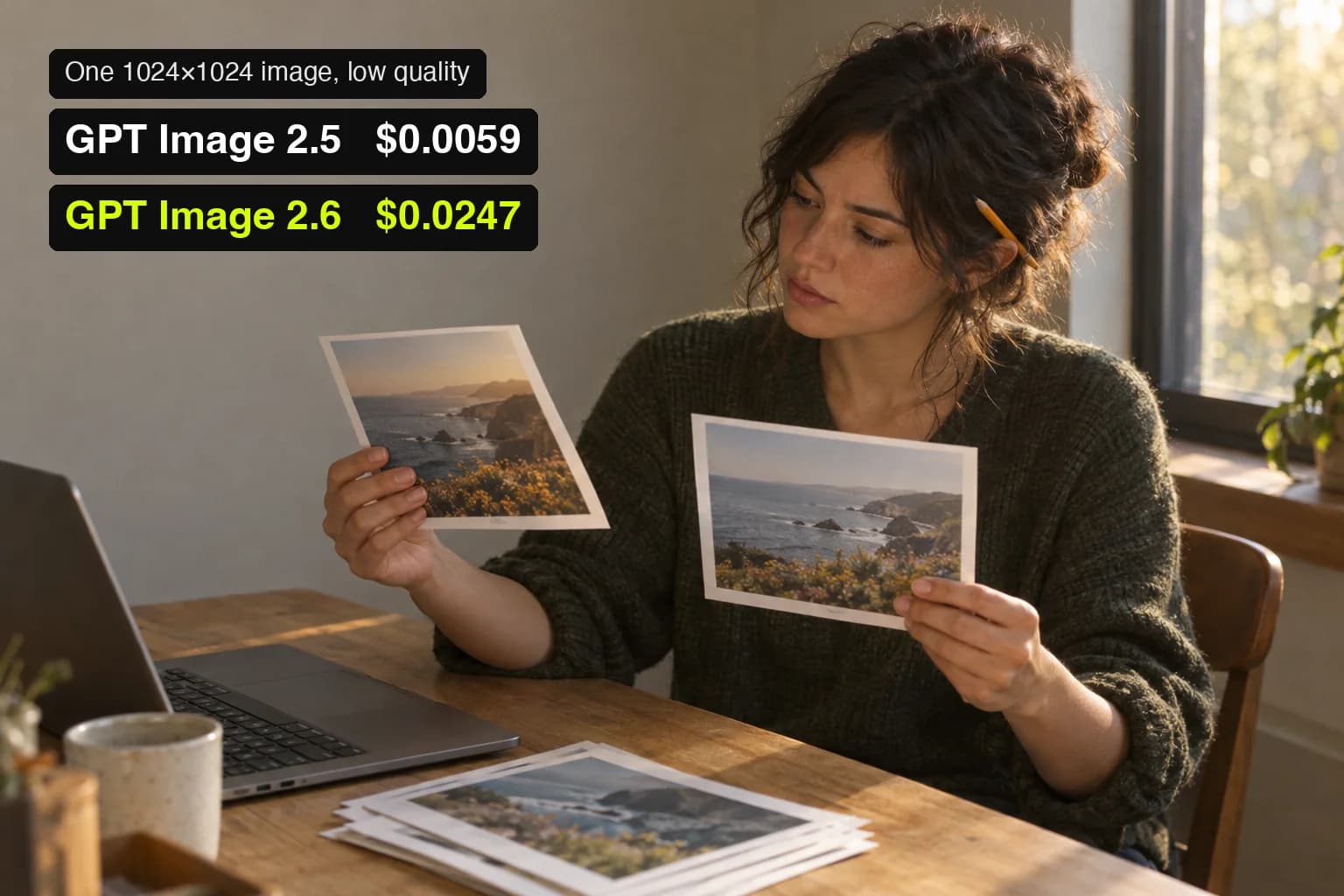
gpt-image-2.5-flare) 유지: 최종안을 고르기 전에 수십 장의 테스트 썸네일을 뽑는다면 2.5가 훨씬 경제적입니다. GPT Image 2.6은low품질에서 출력 토큰을 4.2배(1024×1024 기준 $0.0247 vs $0.0059),medium에서 3.3배($0.0435 vs $0.0132) 더 소비하므로, 초안은 2.5에서 돌리고 최종 렌더만 2.6high(양쪽 모두 $0.0527)로 올리면 최종 품질을 잃지 않고 반복 비용을 크게 줄일 수 있습니다.
| 품질 티어 | 2.5 (1024×1024) | 2.6 (1024×1024) | 프롬프트 파이프라인 최적 역할 |
|---|---|---|---|
low | $0.0059 | $0.0247 | 구도 확인(2.5에서 초안 작성, 꼭 필요하지 않으면 2.6 생략) |
medium | $0.0132 | $0.0435 | 내부 크리에이티브 리뷰 및 빠른 클라이언트 시안 |
high | $0.0527 | $0.0527 | 최종 프로덕션 에셋, 타이포그래피, 이커머스 히어로 샷 |
xhigh | $0.0937 | $0.0937 | 고밀도 인포그래픽, 캐릭터 시트, 2K 인쇄 레이아웃 |
max | $0.2107 | $0.2107 | 히어로 인쇄 포스터 및 최고 디테일 멀티 레퍼런스 합성 |
TokLab에서 활용할 수 있는 실전 팁 하나가 더 있습니다. 토큰 그리드가 짧은 변을 기준으로 스케일되기 때문에 1536x1024나 1024x1536 이미지가 정사각형 1024x1024보다 오히려 저렴합니다(high 기준 $0.0412 vs $0.0527). 레이아웃이 정사각형을 강제하지 않는다면 가로 3:2 또는 세로 2:3 프레임을 선택해 약 22% 적은 비용으로 더 많은 픽셀을 확보할 수 있습니다.
아래 모든 프롬프트에 바로 쓰는 TokLab API 스타터
TokLab의 이미지 생성과 편집은 모두 POST https://api.toklab.ai/v1/images/generations를 통해 비동기로 실행됩니다. JSON 페이로드를 전송해 반환된 작업 id를 받고, status가 completed 또는 failed가 될 때까지 GET https://api.toklab.ai/v1/tasks/{id}를 폴링하면 됩니다. 실패한 작업에는 과금되지 않으며, 모든 참조 이미지·마스크·마크업 오버레이는 base64 문자열이 아니라 공개 HTTP/HTTPS URL로 전달해야 합니다.
curl -sS https://api.toklab.ai/v1/images/generations \
  -H "Authorization: Bearer $TOKLAB_API_KEY" \
  -H "Content-Type: application/json" \
  -d '{
    "model": "gpt-image-2.6-sunburst",
    "prompt": "Studio macro product photograph of a frosted amber glass dropper bottle...",
    "size": "1536x1024",
    "quality": "high",
    "complexity": "high",
    "output_format": "png"
  }'
complexity 필드(low, medium, high)에 주목하세요. GPT Image 2.6에서 complexity는 렌더링 전 모델이 수행하는 레이아웃 계획량을 제어하며 추가 토큰 할증이 붙지 않습니다. 공간 정렬이 중요한 포스터, UI 화면, 다이어그램, 캐릭터 시트에서는 high로 유지하세요.
1. 이커머스 제품 사진 (프롬프트 1–3)
제품 팀이 "luxury skincare bottle on marble" 같은 두루뭉술한 프롬프트로 실패하는 이유는 늘 같습니다. 모델이 일그러진 세리프 라벨, 붕 뜬 반사광, 방향이 안 맞는 그림자를 만들어 마켓플레이스 가이드를 통과하지 못합니다. 대신 카메라 초점거리, 표면 재질, 키 라이트 방향, 큰따옴표로 묶은 정확한 라벨 문자열, 네거티브 제약을 고정해야 합니다.
프롬프트 1: 선명한 패키지 문구가 들어간 매트 세라믹 스킨케어 보틀
Commercial studio product photograph of a matte warm-sand ceramic serum bottle with a brushed brass pump dispenser, standing upright on a honed travertine plinth. Printed directly on the front of the bottle in clean black grotesque sans-serif typography, centered: "SOLIS" at the top, "BARRIER SERUM" in smaller tracked uppercase below, and "30 ML / 1.0 FL OZ" near the base. Soft diffused window key light from camera left casting a long, gentle shadow to the right, subtle fill card on the right edge to keep label contrast crisp. Shot on 90mm macro lens at f/5.6, shallow background falloff into warm limestone plaster, realistic ceramic micro-grain, accurate brass specular highlights. No water droplets, no floating petals, no extra logos, no watermark.모델 및 티어 노트: gpt-image-2.6-sunburst에서 quality: "high", size: "1024x1536"으로 실행하세요. 상세페이지(PDP) 갤러리용 누끼가 필요하다면 "background": "transparent"와 "output_format": "png"를 지정하고 트래버틴 받침대 묘사를 "isolated on a transparent background with a soft contact shadow directly under the base"로 교체합니다.
프롬프트 2: 마켓플레이스 히어로 배너용 탑다운 플랫레이 커피 키트
Editorial top-down 90-degree flat-lay photograph for a specialty coffee roaster homepage banner, 3:2 landscape composition with generous clean negative space on the left third for web overlay text. Arranged neatly on a light ash-wood tabletop: a matte black gooseneck pour-over kettle, a ribbed white ceramic dripper resting on a glass server, a kraft-paper coffee bag labeled "HIGHLAND WASHED" and "250G WHOLE BEAN" in crisp charcoal ink, and a small brass dosing scoop beside six roasted beans. Even overcast north-window daylight, crisp contact shadows, true-to-life paper fiber and wood grain, calibrated neutral color balance. Zero steam trails, zero hands, no garbled small print on the bag.모델 및 티어 노트: A/B 광고 테스트용 탑다운 플랫레이는 gpt-image-2.6-flare medium(1536x1024 기준 $0.0340)으로도 충분히 잘 나옵니다. 우승 레이아웃이 정해지면 원두 봉투 타이포그래피를 깔끔히 고정하기 위해 high($0.0412)로 올리세요.
프롬프트 3: 테크니컬 러닝화 소재 강조 스튜디오 샷
High-contrast commercial footwear studio shot of a modern carbon-plated running shoe angled three-quarters toward camera left, suspended three centimeters above a matte slate-gray cyclorama. Upper in breathable engineered off-white mesh with subtle translucent ripstop overlays, sculpted dual-density foam midsole in chalk white with a visible matte-black carbon plate edge, and translucent amber rubber outsole lugs. Dual strip-box rim lighting carving out the silhouette against a seamless dark graphite gradient, crisp top softbox revealing mesh weave texture. Shot on medium-format digital camera, 80mm lens, f/8 front-to-back sharpness. No brand swoosh, no text, no motion blur.2. UI, 앱 목업, 랜딩 페이지 비주얼 (프롬프트 4–6)
UI 목업은 "a sleek SaaS dashboard"처럼 추상적으로 묻지 않고 그리드 구조, 컴포넌트 위계, 정확한 카피 문자열을 와이어프레임 명세서처럼 적어 줄 때 GPT Image 2.6이 구형 디퓨전 모델을 크게 앞서는 영역입니다.
프롬프트 4: 라이트 모드 핀테크 애널리틱스 데스크톱 대시보드
Crisp product UI screenshot mockup of a modern B2B treasury dashboard displayed flat-on with zero perspective tilt, 16:9 widescreen desktop layout on a #F8FAFC canvas. Left narrow navigation sidebar in white with clean 1px #E2E8F0 border and five items: "Overview", "Accounts", "Transfers", "Cards", "Settings". Top header bar showing "Cash Position" on the left and a dark navy primary button labeled "New Transfer" on the right. Main content area uses a clean 12-column grid: top row has three white KPI cards with subtle shadows reading "Total Liquidity $4,820,400", "30-Day Net Flow +$312,900", and "Yield APY 4.85%". Below the KPIs, a wide area chart card titled "Daily Balance Trend" with a crisp emerald line and light green gradient fill, paired with a right-hand table card titled "Recent Settlements" listing four clean rows. Inter-style geometric sans-serif typography, tabular numerals, generous padding, zero lorem ipsum, zero garbled glyphs.모델 및 티어 노트: UI 스크린샷은 항상 gpt-image-2.6-sunburst에 "complexity": "high"와 "quality": "high"를 함께 넘기세요. 화면비 3:1을 넘는 세로형 전체 랜딩 페이지나 긴 이커머스 상세페이지는 GPT Image 2.6에 억지 크롭을 걸기보다 Kling Image 4.0 Long Image로 전환하는 편이 낫습니다.
프롬프트 5: 모바일 피트니스 코칭 앱 3화면 프레젠테이션
Clean marketing presentation of three frameless matte-black smartphone screens arranged horizontally on a soft cool-gray studio surface, gentle ambient shadow underneath, 3:2 landscape framing. Left screen shows a dark-mode workout timer with a circular lime-green progress ring reading "14:20" and button "PAUSE". Center screen (slightly larger, foreground) shows a daily readiness screen titled "Recovery Score", bold numeral "88", three horizontal metric bars labeled "Sleep", "HRV", and "Strain". Right screen shows a weekly bar chart titled "Active Minutes" with seven labeled day columns M through S. Sharp vector-like UI rendering, authentic iOS status bar icons, high contrast, completely legible labels, no fingerprints or glass glare.프롬프트 6: 개발자 API 문서를 담은 아이소메트릭 브라우저 창
Minimalist editorial SaaS feature visual on a warm off-white #FAF9F6 background. A clean macOS browser window slightly angled at 12 degrees with soft layered drop shadow, showing a two-pane API documentation page. Left pane displays a structured endpoint list with HTTP method pills "POST /v1/images", "GET /v1/tasks", and "POST /v1/videos". Right pane displays a dark charcoal syntax-highlighted JSON code card with neat monospace indentation and a green "200 OK" response badge in the top corner. Restrained ink-black, slate, and electric-cobalt accent palette, razor-sharp edges, no floating 3D cartoons, no lens flare.3. 에디토리얼 타이포그래피, 포스터, 캠페인 아트 (프롬프트 7–9)
타이포그래피는 서체 계열, 굵기, 대소문자, 공간 배치, 한 글자도 틀리지 않은 원문 카피를 지정하고 불필요한 추가 텍스트를 명시적으로 금지할 때 성공합니다. "크레딧"이나 "부제"를 비워 두면 이미지 모델이 빈칸을 유사 라틴어 잡문자로 채워 버립니다.
프롬프트 7: 스위스 모더니즘 디자인 컨퍼런스 포스터
International Typographic Style poster in 2:3 vertical format, printed on lightly textured uncoated ivory paper with subtle risograph ink grain. Strict asymmetric Swiss grid built from bold vermilion red and deep carbon black geometric blocks. Upper left quadrant features giant tight-tracked Helvetica-style uppercase headline stacked on three lines: "FORM", "SYSTEMS", "2026". Lower right quadrant features clean smaller black body copy: "ZURICH DESIGN SYMPOSIUM", "NOVEMBER 14-16", "KUNSTHALLE MAIN HALL". A single overlapping halftone black circle intersects the central grid line. Flat overhead scan presentation with crisp paper margins, museum-grade print fidelity, zero misspelled letters, zero unrequested logos.프롬프트 8: 압도적 공간감의 SF 영화 티저 포스터
Cinematic widescreen 16:9 science-fiction teaser poster. A lone astronaut in a matte white pressure suit stands viewed from behind at the bottom center of a colossal subterranean basalt cavern, facing a suspended monolithic ring of glowing amber light floating above dark still water. Volumetric shafts of pale cyan mist descend from a narrow fissure far overhead, creating dramatic atmospheric depth and subtle water reflections. Centered near the bottom in wide-tracked metallic silver uppercase serif typography: "ORBITAL ZERO". Directly below in smaller spaced caps: "SIGNAL LOST. MISSION CONTINUES." Photorealistic anamorphic lens rendering, subtle 35mm film grain, deep obsidian shadows with warm amber highlights, no extra characters, no billing block clutter.프롬프트 9: 미드센추리 실크스크린 해안 여행 포스터
Vintage 1960s screen-printed travel poster in 2:3 vertical proportions celebrating the Cinque Terre coastline. Stylized flat gouache shapes with crisp hand-cut stencil edges and visible matte paper texture: terraced pastel ochre, terracotta, and coral cliffside houses stacked above a deep cobalt sea, two tiny white sailboats in the harbor, and dark green olive branches framing the upper corners. Bold cream-white geometric sans-serif title across the bottom banner: "CINQUE TERRE" with smaller subtitle "ITALIAN RIVIERA" centered underneath. Limited six-color silkscreen ink palette with slight authentic print registration texture, warm Mediterranean noon sunlight, zero modern cars, zero watermarks.4. 아이소메트릭 다이어그램과 기술 설명 그래픽 (프롬프트 10–12)
문서화 팀과 테크니컬 라이터는 Blender나 Illustrator를 열지 않고도 건조한 아키텍처 문단을 명료한 다이어그램으로 바꾸는 데 GPT Image 2.6을 활용합니다. 타이포그래피 선명도를 유지하려면 노드 라벨을 13단어로 짧게 유지하고 한 프레임당 전체 라벨 수를 68개 이내로 제한하세요.
프롬프트 10: 클라우드 API 게이트웨이 아키텍처 아이소메트릭 다이어그램
Clean isometric technical architecture diagram on a pure white background, 3:2 landscape format, modern engineering documentation aesthetic using fine slate-gray 2px linework and soft pastel blue, teal, and amber accents. Four connected isometric platform blocks arranged left to right along directional arrows: Block 1 labeled "CLIENT SDK" (laptop and terminal icon), Block 2 labeled "API GATEWAY" (shield and routing nodes), Block 3 labeled "TASK QUEUE" (stacked job cards), and Block 4 split into two parallel worker pads labeled "IMAGE WORKERS" and "VIDEO WORKERS". Crisp geometric sans-serif callout labels in dark charcoal, consistent 30-degree isometric projection, uniform subtle floor shadows, zero clutter, zero unreadable micro-text.프롬프트 11: 기계식 시계 무브먼트 절개 기술 일러스트
Editorial technical cutaway illustration of a mechanical chronograph wristwatch movement in 1:1 square format on a warm archival parchment background. Drawn in precise ink-and-watercolor engineering manual style, showing exposed brass gear trains, blued steel screws, ruby jewel bearings, balance wheel, and coiled mainspring barrel in accurate layered depth. Five thin straight leader lines pointing to clean uppercase labels around the perimeter: "MAINSPRING", "BALANCE WHEEL", "ESCAPEMENT", "ROTOR", and "JEWEL BEARING". Crisp drafting line weight, realistic metallic shading, no overlapping text, no decorative border.프롬프트 12: 4단계 가로형 워크플로 인포그래픽 카드
Clean horizontal 16:9 process infographic on a pale #F4F6F8 background designed for a technical blog post. Four equal rounded white cards arranged in a single row connected by slim dark-gray right-pointing arrows. Each card has a numbered cobalt-blue circle badge at top left, a minimal monochrome line icon in the center, and a bold title plus short subtitle: Card 1 "01 SUBMIT" / "POST JSON payload", Card 2 "02 QUEUE" / "Receive task ID", Card 3 "03 POLL" / "Check status URL", Card 4 "04 DELIVER" / "Download CDN asset". Flat vector editorial design, generous margins, razor-sharp alignment, zero stray text.5. 캐릭터 일관성과 컨셉 아트 시트 (프롬프트 13–15)
게임 스튜디오와 브랜드 팀은 애니메이터나 비디오 모델에 아트워크를 넘기기 전에 여러 각도와 표정이 일관된 캐릭터 시트를 확보해야 합니다. 턴어라운드, 표정, 소품 디테일을 한 장에 모두 담을 때는 gpt-image-2.6-sunburst의 xhigh 품질(1024×1024 기준 $0.0937)을 사용하세요.
프롬프트 13: 풀 캐릭터 턴어라운드 및 표정 시트
Professional animation studio character design sheet on a clean off-white drafting background with subtle light-gray section dividers, 3:2 landscape layout. Subject is "KAI", a 28-year-old coastal salvage engineer with wind-tousled dark hair, a weathered teal waxed-canvas jacket over a cream knit sweater, dark utility trousers, tool holster at the hip, and scuffed leather boots. Left half shows full-body front, side profile, and back turnaround poses in neutral A-pose with identical proportions and lighting. Right upper quadrant shows four head-and-shoulder expression sketches labeled "NEUTRAL", "FOCUSED", "GRIN", and "SURPRISED". Right lower quadrant displays a five-swatch color palette strip and two isolated prop details: brass diving compass and canvas satchel. Clean painterly concept-art brushwork with crisp ink linework, zero watermark.프롬프트 14: 투명 배경 브랜드 마스코트 포즈 시트
Cohesive 2x2 grid of four poses for a friendly geometric robot mascot made of matte off-white ceramic with rounded rectangular screen face displaying simple cyan pixel eyes and a soft coral antenna tip. Top-left: waving hello; top-right: holding a tiny magnifying glass; bottom-left: giving a thumbs-up; bottom-right: carrying a cardboard parcel. Consistent studio softbox lighting, identical proportions and material finish across all four poses, soft 3D vinyl toy aesthetic, clean transparent background, no shadows extending off edges, no text.모델 및 티어 노트: "background": "transparent"와 "output_format": "png"를 넘기면 4분할 이미지를 잘라 온보딩 화면이나 빈 상태(empty-state) UI 일러스트에 바로 투입할 수 있습니다.
프롬프트 15: 스트리트웨어 룩북 에디토리얼 포트레이트
35mm analog editorial portrait photograph of a young East Asian model standing outside a Tokyo architectural concrete gallery at dusk, medium shot framed from waist up. Wearing an oversized charcoal wool trench coat, structured black mock-neck top, and minimal silver hoop earrings. Cool ambient twilight sky balanced against warm tungsten interior light spilling through floor-to-ceiling glass behind the subject. Shot on 50mm f/2 lens, authentic Kodak Portra 400 grain, natural unretouched skin texture, realistic fabric drape, sharp focus on eyes, soft background bokeh. No text, no watermark, no artificial skin smoothing.6. 멀티 이미지 편집, 마크업 오버레이, 리라이팅 (프롬프트 16–18)
TokLab에서는 이미지 편집도 똑같은 POST /v1/images/generations 엔드포인트를 사용합니다. images 배열(참조 URL 1~16개)을 붙이고 필요에 따라 mask 또는 GPT Image 2.6의 새 markup 오버레이를 추가하면 됩니다. 한 가지 엄격한 스키마 규칙만 기억하세요. 같은 요청에 mask와 markup을 동시에 보낼 수 없으며, 모든 URL은 HTTP/HTTPS로 외부에서 접근 가능해야 합니다.
{
  "model": "gpt-image-2.6-sunburst",
  "prompt": "Place the matte ceramic bottle from image 1 onto the wet slate counter in image 2, matching the cool overcast window reflections from the left. Keep the bottle label text and brass pump geometry completely unchanged.",
  "images": [
    { "image_url": "https://cdn.example.com/assets/bottle-studio.png" },
    { "image_url": "https://cdn.example.com/scenes/slate-counter.png" }
  ],
  "size": "1536x1024",
  "quality": "high",
  "complexity": "high",
  "output_format": "png"
}
프롬프트 16: 두 장의 참조 이미지로 만드는 제품 배치 합성
Composite the product from image 1 onto the wooden kitchen counter in image 2, positioned slightly right of center beside the ceramic mug. Preserve the exact silhouette, label typography, cap proportions, and matte finish of image 1 without redrawing any letters. Match the warm morning directional sunlight coming from the window in image 2, casting a grounded contact shadow and subtle bounced warm highlight along the product's right edge. Keep all background cabinetry and lighting in image 2 unchanged.프롬프트 17: 마크업 기반 국소 인테리어 교체
Follow the red hand-drawn markup annotations on image 1: replace only the circled navy fabric armchair with a mid-century walnut-frame lounge chair upholstered in cognac aniline leather. Match the exact perspective, floor shadow softness, and warm afternoon window light of the existing living room. Leave the rug weave, coffee table, bookshelf, wall art, and camera framing completely untouched.API 노트: 원본 방 사진은 images: [{ "image_url": "..." }]에, 빨간 동그라미가 그려진 투명 PNG는 markup: { "image_url": "..." }에 전달합니다. 마크업 오버레이는 표준 이미지 입력 토큰($8/1M) 외에 별도 추가 요금이 없습니다.
프롬프트 18: 카탈로그 SKU용 일관된 배치 배경 교체
Keep the footwear product from image 1 pixel-faithful in shape, stitching, sole tread, and color accuracy, and relocate it onto a sunlit pale limestone outdoor terrace step with soft dappled eucalyptus leaf shadows falling across the stone behind the shoe. Maintain the exact camera angle and focal length of image 1, add realistic ambient occlusion under the outsole, and keep the foreground sharp with gentle f/4 background blur. No extra props, no text.GPT Image 2.6에서 헛된 렌더를 막는 5가지 규칙
- 네거티브 제약을 명시적으로 적으세요. GPT Image 2.6은 직접적인 제외 조건("no extra logos, no water droplets, no floating text")을 충실히 따릅니다. 스타일 형용사 다섯 개를 더 붙이는 것보다 원하지 않는 클리셰 두 가지를 금지하는 쪽이 재시도를 훨씬 많이 줄여 줍니다.
- 읽혀야 할 모든 단어는 따옴표로 묶으세요. "라벨 위의 제품 스펙", "하단의 작은 크레딧"처럼 모호하게 적은 텍스트는 글자 모양 노이즈로 망가집니다. 필요한 문자열은 전부 따옴표 안에 넣고 나머지는 비워 두세요.
- 초안은 2.5에서, 최종본은 2.6에서 뽑으세요. GPT Image 2.6의
low티어는 GPT Image 2.5의low보다 4.2배 비싸므로, 프롬프트 반복은gpt-image-2.5-flarelow에서 끝내고 최종 렌더만gpt-image-2.6-sunbursthigh로 전환하세요. - 전송 전
size의 16배수 조건을 확인하세요. TokLab의 모든 커스텀WIDTHxHEIGHT는 가로·세로가 모두 16의 배수여야 하며, 어느 변도 3840픽셀을 넘지 않고, 화면비는 1:33:1, 총 픽셀 수는 655,3608,294,400 범위 안에 들어야 합니다. svg와gif출력은 전용 스키마 규칙을 지키세요. GPT Image 2.6에서output_format: "svg"는n: 1이 필수이며 참조images를 받을 수 없고,output_format: "gif"는 2~16 범위의frame_count를 지원하지만mask와 함께 쓸 수 없습니다.
가장 흔한 GPT Image 2.6 프롬프트 결함 4가지 해결법
잘 짜인 프롬프트도 실제 사용자나 자동화 파이프라인이 다양한 상품 카피를 밀어 넣기 시작하면 예측 가능한 엣지 케이스에 부딪힙니다. 품질을 high에서 max로 올려 재시도 비용을 태우기 전에 아래 네 가지 결함 중 무엇이 원인인지 먼저 진단하세요.
- 요청하지 않은 라벨이나 가짜 영양성분표 생성: 카피 범위를 닫아 두지 않고 보틀·포스터·대시보드를 "authentic"이나 "detailed"로 묘사하면 GPT Image 2.6이 빈 공간에 자잘한 가짜 글자를 채워 넣습니다. 텍스트가 들어가는 프롬프트 끝에는 항상 "only the quoted strings above appear in the image; leave all other surfaces blank" 같은 명시적 제외 문구를 붙이세요.
- 멀티 이미지 편집 중 색상·형태 드리프트: 어떤 이미지가 어떤 속성을 담당하는지 밝히지 않고 참조 이미지 4~5장을 넘기면 이미지 2의 조명 큐가 이미지 1의 제품 색상을 덮어써 버립니다. 모든 멀티 이미지 프롬프트 첫머리에 역할 맵("image 1 is the exact product geometry and label; image 2 is the environment and lighting only")을 명시하고, 편집 충실도를 위해
gpt-image-2.6-sunburst를 유지하세요. - 투명 PNG 누끼의 거친 흰색 테두리(halo):
"background": "transparent"를 넘기면서 프롬프트에 "studio lighting on a white studio sweep"을 적으면 지시가 충돌합니다. 모델이 흰 바닥을 전제로 한 밝은 림 반사광을 그려 넣어 다크 모드 스토어프런트 위에 올렸을 때 분필처럼 하얗게 뜹니다. 대신 중립적이고 균일한 조명을 묘사하고 "clean crisp alpha edges with no white fringe"를 명시하세요. - 자동 재시도 루프의 예상치 못한 요금 급증: GPT Image 2.6의
low품질이 GPT Image 2.5의low보다 4.2배 비싸기 때문에, 사용자 클릭당low초안 6장을 찍어 내는 무제한 재시도 루프는 월간 지출을 조용히 네 배로 불립니다. 자동 재시도는 최대 2회로 제한하고, 탐색용 썸네일은gpt-image-2.5-flare에 두며, 확정된 프롬프트만gpt-image-2.6-sunbursthigh로 승격하세요.
배치 파이프라인과 자동 QA를 위한 프롬프트 구조화
이 템플릿들을 수동 플레이그라운드 테스트에서 백엔드 워커로 옮길 때는 지저분한 사용자 입력을 한 문단에 바로 이어 붙이지 말고 프롬프트를 모듈화하세요. 모든 프롬프트 템플릿을 네 개의 결정론적 슬롯(피사체·제품 기하, 씬·조명 물리, 따옴표 타이포그래피 원문, 고정 네거티브 제약)으로 분리합니다. 네 슬롯을 따로 저장해 두면 히어로 렌더를 성공시켰던 렌즈 초점거리나 조명 구성을 깨뜨리지 않고도 SKU 이름, 시즌 배경, 현지화 카피만 안전하게 갈아 끼울 수 있습니다.
GET /v1/tasks/{id}에서 완료된 작업을 저장하기 전에 반환된 이미지 해상도, 투명 채널(background: "transparent" 요청 시), 그리고 따옴표로 지정한 패키지 텍스트의 OCR 결과를 가볍게 후검증하세요. 고가치 이커머스 에셋의 라벨에서 글자 하나가 빠졌을 때 해당 SKU 한 건만 gpt-image-2.6-sunburst + complexity: "high"로 재시도하면 카탈로그 품질을 지키면서도 전체 배치 단가를 예측 가능하게 유지할 수 있습니다.
이 템플릿들을 코드로 실행할 준비가 되었다면 GPT Image 2.6에서 전체 파라미터 레퍼런스를 확인하거나 TokLab 카탈로그에서 이미지 모델별 실시간 요율을 비교해 보세요.