Libreria di prompt GPT Image 2.6: 18 template di produzione e payload API
Copia 18 prompt di produzione per GPT Image 2.6 Flare e Sunburst su ecommerce, mockup UI, tipografia, diagrammi e modifiche multi-immagine con note sui costi.
Leggi in MarkdownLa maggior parte delle raccolte di prompt offre descrizioni artistiche di una riga che fanno bella figura in un tweet e crollano nell'istante in cui un product designer chiede testi leggibili sul packaging, un formato 16:9 esatto o una modifica pulita su uno scatto di studio esistente. GPT Image 2.6 premia un'abitudine diversa: scrivere prompt come brevi brief di produzione che fissano geometria del layout, fisica della luce, texture dei materiali, testo letterale tra virgolette e tutto ciò che deve restare fuori dall'inquadratura.
Questo ricettario raccoglie 18 prompt pronti da copiare organizzati intorno a sei workflow reali di produzione: fotografia prodotto ecommerce, mockup UI e app, poster editoriali, diagrammi tecnici isometrici, turnaround di personaggi e modifiche multi-immagine. Ogni sezione indica quando chiamare gpt-image-2.6-flare rispetto a gpt-image-2.6-sunburst, dove GPT Image 2.5 resta imbattibile sull'economia delle bozze e come inviare il payload JSON esatto a https://api.toklab.ai/v1/images/generations.
Scegliere tra Flare, Sunburst e GPT Image 2.5 prima del render
Prima di incollare un singolo prompt in un job batch, decidi quale slug e quale livello di qualità corrispondono alla fase della tua pipeline. Su TokLab sia gpt-image-2.6-flare sia gpt-image-2.6-sunburst condividono lo stesso listino a token ($30 per milione di token immagine in output, $8 per milione di token immagine in input e $5 per milione di token testuali in input sullo schema di riferimento OpenAI; verifica le tariffe live del gateway su TokLab pricing). Scegliere Sunburst non aumenta il prezzo per token, rendendo la scelta puramente funzionale:
- Usa
gpt-image-2.6-flareper esplorazione rapida di concept, varianti creative pubblicitarie, scene lifestyle e pipeline in cui la latenza conta più della precisione chirurgica di editing. - Usa
gpt-image-2.6-sunburstper poster ricchi di tipografia, composizioni con più immagini di riferimento, modifiche guidate da markup e scatti di prodotto in cui riflessi speculari o crenatura delle etichette devono reggere l'ispezione ravvicinata. - Mantieni GPT Image 2.5 (
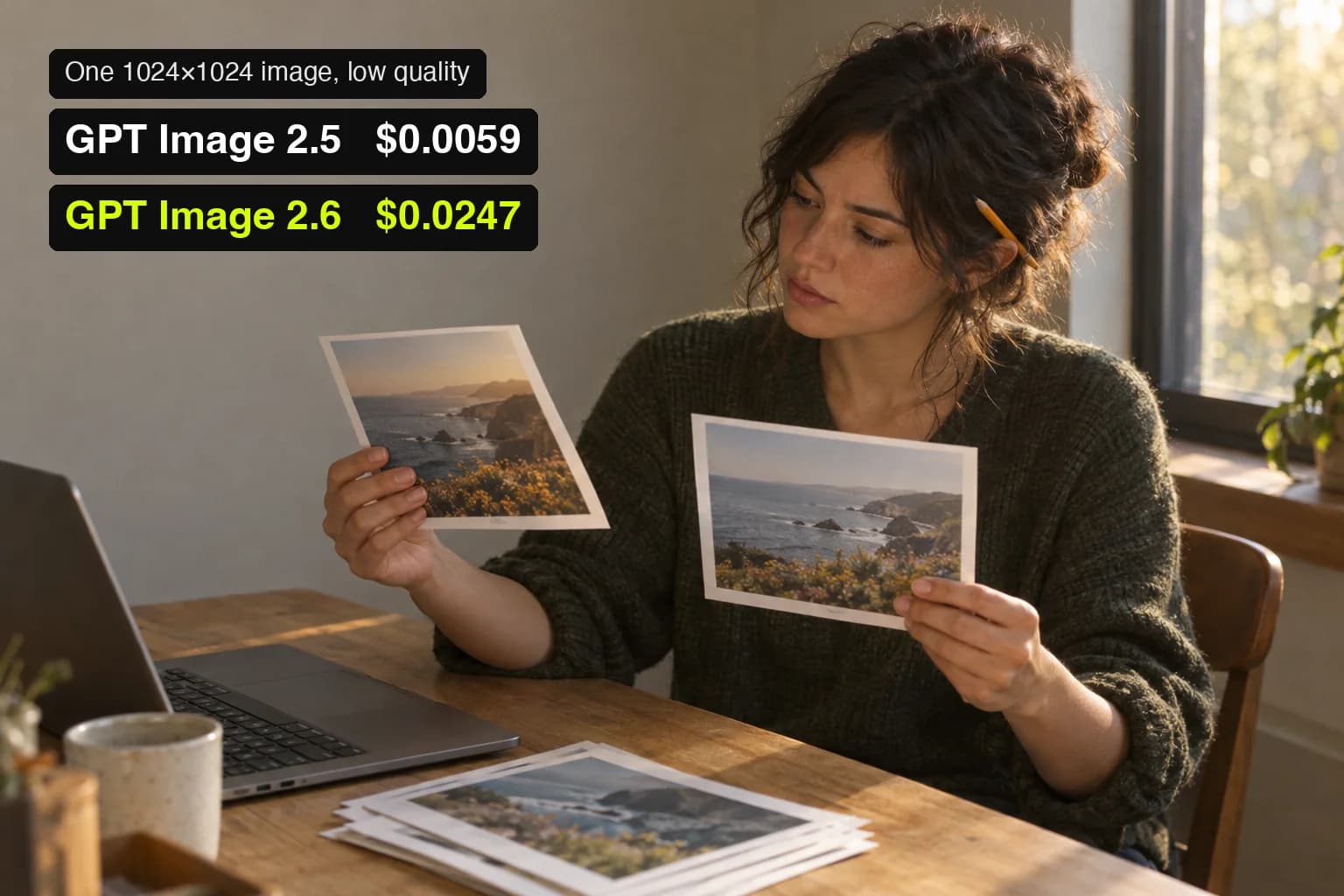
gpt-image-2.5-flare) nel tier delle bozze se generi decine di miniature di prova prima di selezionare la vincitrice. Poiché GPT Image 2.6 utilizza 4,2 volte più token di output a qualitàlow($0,0247 contro $0,0059 a 1024×1024) e 3,3 volte amedium($0,0435 contro $0,0132), fare bozze su 2.5 e promuovere i render finali su 2.6 ahigh($0,0527 su entrambi) abbatte la spesa di iterazione senza cedere nulla sulla resa finale.
| Livello di qualità | 1024×1024 su 2.5 | 1024×1024 su 2.6 | Ruolo migliore nella pipeline |
|---|---|---|---|
low | $0.0059 | $0.0247 | Verifiche di composizione (bozze su 2.5, salta su 2.6 se non serve) |
medium | $0.0132 | $0.0435 | Revisioni creative interne e prove rapide per il cliente |
high | $0.0527 | $0.0527 | Asset finali di produzione, tipografia e scatti hero ecommerce |
xhigh | $0.0937 | $0.0937 | Infografiche dense, schede personaggio e layout stampa 2K |
max | $0.2107 | $0.2107 | Poster hero da stampa e compositi multi-riferimento al massimo dettaglio |
Una scorciatoia pratica su TokLab: un'immagine 1536x1024 o 1024x1536 costa meno di un quadrato 1024x1024 ($0,0412 contro $0,0527 a high) perché la griglia di token scala sul lato corto. Ogni volta che il layout ammette un rettangolo 3:2 o 2:3 al posto del quadrato secco, ottieni più pixel spendendo circa il 22% in meno.
Starter API TokLab pronto da eseguire per tutti i prompt sotto
Generazione e modifica immagini su TokLab girano entrambe in modo asincrono su POST https://api.toklab.ai/v1/images/generations. Invia un payload JSON, recupera l'id del task restituito e interroga GET https://api.toklab.ai/v1/tasks/{id} finché status non diventa completed o failed. I task falliti non vengono addebitati, e tutte le immagini di riferimento, maschere e overlay di markup vanno passati come URL HTTP o HTTPS pubblici anziché stringhe base64.
curl -sS https://api.toklab.ai/v1/images/generations \
  -H "Authorization: Bearer $TOKLAB_API_KEY" \
  -H "Content-Type: application/json" \
  -d '{
    "model": "gpt-image-2.6-sunburst",
    "prompt": "Studio macro product photograph of a frosted amber glass dropper bottle...",
    "size": "1536x1024",
    "quality": "high",
    "complexity": "high",
    "output_format": "png"
  }'
Nota il campo complexity (low, medium o high). Su GPT Image 2.6 complexity regola quanto lavoro di pianificazione spaziale il modello esegue prima del render e non comporta alcun sovrapprezzo di token. Lascialo su high per poster, schermate UI, diagrammi e schede personaggio dove l'allineamento conta.
1. Fotografia prodotto ecommerce (Prompt 1–3)
I team di prodotto falliscono di solito con prompt generici come «luxury skincare bottle on marble». Il modello inventa etichette serif deformate, riflessi sospesi e ombre incoerenti che non superano le linee guida dei marketplace. Blocca invece focale, materiale della superficie, direzione della luce chiave, stringhe esatte dell'etichetta tra virgolette doppie e vincoli negativi.
Prompt 1: Flacone skincare in ceramica opaca con testo packaging nitido
Commercial studio product photograph of a matte warm-sand ceramic serum bottle with a brushed brass pump dispenser, standing upright on a honed travertine plinth. Printed directly on the front of the bottle in clean black grotesque sans-serif typography, centered: "SOLIS" at the top, "BARRIER SERUM" in smaller tracked uppercase below, and "30 ML / 1.0 FL OZ" near the base. Soft diffused window key light from camera left casting a long, gentle shadow to the right, subtle fill card on the right edge to keep label contrast crisp. Shot on 90mm macro lens at f/5.6, shallow background falloff into warm limestone plaster, realistic ceramic micro-grain, accurate brass specular highlights. No water droplets, no floating petals, no extra logos, no watermark.Nota su modello e tier: esegui su gpt-image-2.6-sunburst con quality: "high" e size: "1024x1536". Se ti serve uno scontorno pulito per una galleria PDP, imposta "background": "transparent" con "output_format": "png" e sostituisci la frase del plinto in travertino con «isolated on a transparent background with a soft contact shadow directly under the base».
Prompt 2: Flat-lay dall'alto di kit caffè per banner hero marketplace
Editorial top-down 90-degree flat-lay photograph for a specialty coffee roaster homepage banner, 3:2 landscape composition with generous clean negative space on the left third for web overlay text. Arranged neatly on a light ash-wood tabletop: a matte black gooseneck pour-over kettle, a ribbed white ceramic dripper resting on a glass server, a kraft-paper coffee bag labeled "HIGHLAND WASHED" and "250G WHOLE BEAN" in crisp charcoal ink, and a small brass dosing scoop beside six roasted beans. Even overcast north-window daylight, crisp contact shadows, true-to-life paper fiber and wood grain, calibrated neutral color balance. Zero steam trails, zero hands, no garbled small print on the bag.Nota su modello e tier: gpt-image-2.6-flare a medium gestisce bene i flat-lay dall'alto per test A/B pubblicitari ($0,0340 a 1536x1024). Passa a high ($0,0412) una volta scelto il layout vincente per fissare nitidamente la tipografia del sacchetto.
Prompt 3: Scarpa da running tecnica con focus sui materiali
High-contrast commercial footwear studio shot of a modern carbon-plated running shoe angled three-quarters toward camera left, suspended three centimeters above a matte slate-gray cyclorama. Upper in breathable engineered off-white mesh with subtle translucent ripstop overlays, sculpted dual-density foam midsole in chalk white with a visible matte-black carbon plate edge, and translucent amber rubber outsole lugs. Dual strip-box rim lighting carving out the silhouette against a seamless dark graphite gradient, crisp top softbox revealing mesh weave texture. Shot on medium-format digital camera, 80mm lens, f/8 front-to-back sharpness. No brand swoosh, no text, no motion blur.2. UI, mockup di app e visual per landing page (Prompt 4–6)
I mockup UI sono il terreno in cui GPT Image 2.6 stacca nettamente i vecchi modelli a diffusione, a patto di descrivere griglia, gerarchia dei componenti e stringhe esatte di copy invece di chiedere «a sleek SaaS dashboard». Tratta il prompt come una specifica wireframe.
Prompt 4: Dashboard desktop fintech analytics in modalità chiara
Crisp product UI screenshot mockup of a modern B2B treasury dashboard displayed flat-on with zero perspective tilt, 16:9 widescreen desktop layout on a #F8FAFC canvas. Left narrow navigation sidebar in white with clean 1px #E2E8F0 border and five items: "Overview", "Accounts", "Transfers", "Cards", "Settings". Top header bar showing "Cash Position" on the left and a dark navy primary button labeled "New Transfer" on the right. Main content area uses a clean 12-column grid: top row has three white KPI cards with subtle shadows reading "Total Liquidity $4,820,400", "30-Day Net Flow +$312,900", and "Yield APY 4.85%". Below the KPIs, a wide area chart card titled "Daily Balance Trend" with a crisp emerald line and light green gradient fill, paired with a right-hand table card titled "Recent Settlements" listing four clean rows. Inter-style geometric sans-serif typography, tabular numerals, generous padding, zero lorem ipsum, zero garbled glyphs.Nota su modello e tier: passa sempre "complexity": "high" e "quality": "high" su gpt-image-2.6-sunburst per gli screenshot UI. Per intere landing page verticali o lunghe schede ecommerce oltre il rapporto 3:1, passa a Kling Image 4.0 Long Image anziché forzare ritagli estremi su GPT Image 2.6.
Prompt 5: Presentazione a tre schermi di un'app mobile di fitness coaching
Clean marketing presentation of three frameless matte-black smartphone screens arranged horizontally on a soft cool-gray studio surface, gentle ambient shadow underneath, 3:2 landscape framing. Left screen shows a dark-mode workout timer with a circular lime-green progress ring reading "14:20" and button "PAUSE". Center screen (slightly larger, foreground) shows a daily readiness screen titled "Recovery Score", bold numeral "88", three horizontal metric bars labeled "Sleep", "HRV", and "Strain". Right screen shows a weekly bar chart titled "Active Minutes" with seven labeled day columns M through S. Sharp vector-like UI rendering, authentic iOS status bar icons, high contrast, completely legible labels, no fingerprints or glass glare.Prompt 6: Finestra browser isometrica con documentazione API per sviluppatori
Minimalist editorial SaaS feature visual on a warm off-white #FAF9F6 background. A clean macOS browser window slightly angled at 12 degrees with soft layered drop shadow, showing a two-pane API documentation page. Left pane displays a structured endpoint list with HTTP method pills "POST /v1/images", "GET /v1/tasks", and "POST /v1/videos". Right pane displays a dark charcoal syntax-highlighted JSON code card with neat monospace indentation and a green "200 OK" response badge in the top corner. Restrained ink-black, slate, and electric-cobalt accent palette, razor-sharp edges, no floating 3D cartoons, no lens flare.3. Tipografia editoriale, poster e visual di campagna (Prompt 7–9)
La tipografia riesce quando specifichi famiglia di caratteri, peso, maiuscole/minuscole, posizione spaziale e testo esatto lettera per lettera, vietando esplicitamente testo aggiuntivo. Ogni volta che lasci generici «crediti» o «sottotitoli», i modelli immagine riempiono lo spazio con pseudo-latino incomprensibile.
Prompt 7: Poster modernista svizzero per conferenza di design
International Typographic Style poster in 2:3 vertical format, printed on lightly textured uncoated ivory paper with subtle risograph ink grain. Strict asymmetric Swiss grid built from bold vermilion red and deep carbon black geometric blocks. Upper left quadrant features giant tight-tracked Helvetica-style uppercase headline stacked on three lines: "FORM", "SYSTEMS", "2026". Lower right quadrant features clean smaller black body copy: "ZURICH DESIGN SYMPOSIUM", "NOVEMBER 14-16", "KUNSTHALLE MAIN HALL". A single overlapping halftone black circle intersects the central grid line. Flat overhead scan presentation with crisp paper margins, museum-grade print fidelity, zero misspelled letters, zero unrequested logos.Prompt 8: Teaser poster cinematografico sci-fi su scala atmosferica
Cinematic widescreen 16:9 science-fiction teaser poster. A lone astronaut in a matte white pressure suit stands viewed from behind at the bottom center of a colossal subterranean basalt cavern, facing a suspended monolithic ring of glowing amber light floating above dark still water. Volumetric shafts of pale cyan mist descend from a narrow fissure far overhead, creating dramatic atmospheric depth and subtle water reflections. Centered near the bottom in wide-tracked metallic silver uppercase serif typography: "ORBITAL ZERO". Directly below in smaller spaced caps: "SIGNAL LOST. MISSION CONTINUES." Photorealistic anamorphic lens rendering, subtle 35mm film grain, deep obsidian shadows with warm amber highlights, no extra characters, no billing block clutter.Prompt 9: Poster di viaggio costiero serigrafato anni '60
Vintage 1960s screen-printed travel poster in 2:3 vertical proportions celebrating the Cinque Terre coastline. Stylized flat gouache shapes with crisp hand-cut stencil edges and visible matte paper texture: terraced pastel ochre, terracotta, and coral cliffside houses stacked above a deep cobalt sea, two tiny white sailboats in the harbor, and dark green olive branches framing the upper corners. Bold cream-white geometric sans-serif title across the bottom banner: "CINQUE TERRE" with smaller subtitle "ITALIAN RIVIERA" centered underneath. Limited six-color silkscreen ink palette with slight authentic print registration texture, warm Mediterranean noon sunlight, zero modern cars, zero watermarks.4. Diagrammi isometrici e visual tecnici esplicativi (Prompt 10–12)
I team di documentazione e i technical writer usano GPT Image 2.6 per trasformare aridi paragrafi architetturali in schemi chiari senza aprire Blender o Illustrator. Tieni brevi le etichette dei nodi (da una a tre parole ciascuna) e limita il totale a sei–otto etichette per fotogramma così la tipografia resta nitidissima.
Prompt 10: Diagramma isometrico di architettura API gateway cloud
Clean isometric technical architecture diagram on a pure white background, 3:2 landscape format, modern engineering documentation aesthetic using fine slate-gray 2px linework and soft pastel blue, teal, and amber accents. Four connected isometric platform blocks arranged left to right along directional arrows: Block 1 labeled "CLIENT SDK" (laptop and terminal icon), Block 2 labeled "API GATEWAY" (shield and routing nodes), Block 3 labeled "TASK QUEUE" (stacked job cards), and Block 4 split into two parallel worker pads labeled "IMAGE WORKERS" and "VIDEO WORKERS". Crisp geometric sans-serif callout labels in dark charcoal, consistent 30-degree isometric projection, uniform subtle floor shadows, zero clutter, zero unreadable micro-text.Prompt 11: Illustrazione tecnica in spaccato di un movimento meccanico d'orologio
Editorial technical cutaway illustration of a mechanical chronograph wristwatch movement in 1:1 square format on a warm archival parchment background. Drawn in precise ink-and-watercolor engineering manual style, showing exposed brass gear trains, blued steel screws, ruby jewel bearings, balance wheel, and coiled mainspring barrel in accurate layered depth. Five thin straight leader lines pointing to clean uppercase labels around the perimeter: "MAINSPRING", "BALANCE WHEEL", "ESCAPEMENT", "ROTOR", and "JEWEL BEARING". Crisp drafting line weight, realistic metallic shading, no overlapping text, no decorative border.Prompt 12: Scheda infografica orizzontale di workflow in quattro passaggi
Clean horizontal 16:9 process infographic on a pale #F4F6F8 background designed for a technical blog post. Four equal rounded white cards arranged in a single row connected by slim dark-gray right-pointing arrows. Each card has a numbered cobalt-blue circle badge at top left, a minimal monochrome line icon in the center, and a bold title plus short subtitle: Card 1 "01 SUBMIT" / "POST JSON payload", Card 2 "02 QUEUE" / "Receive task ID", Card 3 "03 POLL" / "Check status URL", Card 4 "04 DELIVER" / "Download CDN asset". Flat vector editorial design, generous margins, razor-sharp alignment, zero stray text.5. Coerenza del personaggio e schede di concept art (Prompt 13–15)
Studi di videogiochi e team di brand hanno bisogno dello stesso personaggio su più angolazioni ed espressioni prima di consegnare le tavole a un animatore o a un modello video. Usa la qualità xhigh ($0,0937 a 1024×1024) su gpt-image-2.6-sunburst quando una singola tavola raccoglie turnaround, espressioni e dettagli di oggetti di scena.
Prompt 13: Scheda completa di turnaround ed espressioni del personaggio
Professional animation studio character design sheet on a clean off-white drafting background with subtle light-gray section dividers, 3:2 landscape layout. Subject is "KAI", a 28-year-old coastal salvage engineer with wind-tousled dark hair, a weathered teal waxed-canvas jacket over a cream knit sweater, dark utility trousers, tool holster at the hip, and scuffed leather boots. Left half shows full-body front, side profile, and back turnaround poses in neutral A-pose with identical proportions and lighting. Right upper quadrant shows four head-and-shoulder expression sketches labeled "NEUTRAL", "FOCUSED", "GRIN", and "SURPRISED". Right lower quadrant displays a five-swatch color palette strip and two isolated prop details: brass diving compass and canvas satchel. Clean painterly concept-art brushwork with crisp ink linework, zero watermark.Prompt 14: Foglio pose di mascotte aziendale su sfondo trasparente
Cohesive 2x2 grid of four poses for a friendly geometric robot mascot made of matte off-white ceramic with rounded rectangular screen face displaying simple cyan pixel eyes and a soft coral antenna tip. Top-left: waving hello; top-right: holding a tiny magnifying glass; bottom-left: giving a thumbs-up; bottom-right: carrying a cardboard parcel. Consistent studio softbox lighting, identical proportions and material finish across all four poses, soft 3D vinyl toy aesthetic, clean transparent background, no shadows extending off edges, no text.Nota su modello e tier: passa "background": "transparent" e "output_format": "png" così ogni quadrante può essere ritagliato direttamente nelle schermate di onboarding o negli stati vuoti della UI.
Prompt 15: Ritratto editoriale per lookbook streetwear
35mm analog editorial portrait photograph of a young East Asian model standing outside a Tokyo architectural concrete gallery at dusk, medium shot framed from waist up. Wearing an oversized charcoal wool trench coat, structured black mock-neck top, and minimal silver hoop earrings. Cool ambient twilight sky balanced against warm tungsten interior light spilling through floor-to-ceiling glass behind the subject. Shot on 50mm f/2 lens, authentic Kodak Portra 400 grain, natural unretouched skin texture, realistic fabric drape, sharp focus on eyes, soft background bokeh. No text, no watermark, no artificial skin smoothing.6. Modifiche multi-immagine, overlay di markup e relighting (Prompt 16–18)
Su TokLab l'editing utilizza esattamente lo stesso endpoint POST /v1/images/generations: allega un array images (da 1 a 16 URL di riferimento) e opzionalmente una mask oppure il nuovo overlay markup di GPT Image 2.6. Nota una regola di schema rigorosa: mask e markup non possono essere inviati insieme nella stessa richiesta, e ogni URL deve essere raggiungibile pubblicamente via HTTP o HTTPS.
{
  "model": "gpt-image-2.6-sunburst",
  "prompt": "Place the matte ceramic bottle from image 1 onto the wet slate counter in image 2, matching the cool overcast window reflections from the left. Keep the bottle label text and brass pump geometry completely unchanged.",
  "images": [
    { "image_url": "https://cdn.example.com/assets/bottle-studio.png" },
    { "image_url": "https://cdn.example.com/scenes/slate-counter.png" }
  ],
  "size": "1536x1024",
  "quality": "high",
  "complexity": "high",
  "output_format": "png"
}
Prompt 16: Composito di product placement da due immagini di riferimento
Composite the product from image 1 onto the wooden kitchen counter in image 2, positioned slightly right of center beside the ceramic mug. Preserve the exact silhouette, label typography, cap proportions, and matte finish of image 1 without redrawing any letters. Match the warm morning directional sunlight coming from the window in image 2, casting a grounded contact shadow and subtle bounced warm highlight along the product's right edge. Keep all background cabinetry and lighting in image 2 unchanged.Prompt 17: Sostituzione localizzata d'interni guidata da markup
Follow the red hand-drawn markup annotations on image 1: replace only the circled navy fabric armchair with a mid-century walnut-frame lounge chair upholstered in cognac aniline leather. Match the exact perspective, floor shadow softness, and warm afternoon window light of the existing living room. Leave the rug weave, coffee table, bookshelf, wall art, and camera framing completely untouched.Nota API: passa la foto originale della stanza in images: [{ "image_url": "..." }] e il PNG trasparente contenente il cerchio rosso in markup: { "image_url": "..." }. Gli overlay di markup non comportano costi extra oltre i normali token immagine di input ($8 per milione di token).
Prompt 18: Cambio sfondo coerente in batch per SKU di catalogo
Keep the footwear product from image 1 pixel-faithful in shape, stitching, sole tread, and color accuracy, and relocate it onto a sunlit pale limestone outdoor terrace step with soft dappled eucalyptus leaf shadows falling across the stone behind the shoe. Maintain the exact camera angle and focal length of image 1, add realistic ambient occlusion under the outsole, and keep the foreground sharp with gentle f/4 background blur. No extra props, no text.Cinque regole che evitano render sprecati su GPT Image 2.6
- Specifica esplicitamente i vincoli negativi. GPT Image 2.6 segue in modo affidabile le esclusioni dirette («no extra logos, no water droplets, no floating text»). Nominare i due cliché che non vuoi fa risparmiare più retry che aggiungere altri cinque aggettivi di stile.
- Metti tra virgolette ogni parola letterale che vuoi leggere. Qualsiasi testo descritto in modo vago («specifiche del prodotto sull'etichetta», «piccoli crediti in basso») degenera in rumore simile a lettere. Inserisci tra virgolette ogni stringa richiesta e ometti il resto.
- Bozze su 2.5, render finali su 2.6. Poiché il tier
lowdi GPT Image 2.6 costa 4,2 volte quello di GPT Image 2.5, esegui l'iterazione dei prompt sugpt-image-2.5-flarealowe passa agpt-image-2.6-sunburstahighper i render finali. - Controlla la divisibilità di
sizeprima di inviare. Ogni dimensione personalizzataWIDTHxHEIGHTsu TokLab deve avere entrambi i lati divisibili per 16, nessun lato sopra i 3840 pixel, rapporto d'aspetto compreso tra 1:3 e 3:1 e pixel totali tra 655.360 e 8.294.400. - Abbina gli output
svgegifalle rispettive regole di schema. Su GPT Image 2.6,output_format: "svg"richieden: 1e non accettaimagesdi riferimento, mentreoutput_format: "gif"supportaframe_countda 2 a 16 e non può essere combinato conmask.
Correggere i quattro difetti più comuni nei prompt di GPT Image 2.6
Anche prompt ben strutturati incontrano casi limite prevedibili quando utenti reali o pipeline automatizzate inseriscono testi di prodotto variabili. Prima di sprecare altri retry alzando la qualità da high a max, verifica quale di questi quattro difetti di prompt sta davvero causando il problema:
- Etichette extra non richieste o tabelle nutrizionali inventate: quando descrivi un flacone, un poster o una dashboard come «authentic» o «detailed» senza delimitare il testo, GPT Image 2.6 riempie gli spazi vuoti con minuscolo pseudo-testo. Chiudi sempre i prompt che contengono testo con un'esclusione esplicita come «only the quoted strings above appear in the image; leave all other surfaces blank».
- Deriva di colore o geometria nelle modifiche multi-immagine: passare quattro o cinque immagini di riferimento senza indicare quale asset possiede quale proprietà lascia che i segnali di luce dell'immagine 2 sovrascrivano il colore del prodotto nell'immagine 1. Apri ogni prompt multi-immagine con una mappa esplicita dei ruoli («image 1 is the exact product geometry and label; image 2 is the environment and lighting only») e tieni selezionato
gpt-image-2.6-sunburstper la fedeltà dell'editing. - Aloni bianchi netti sugli scontorni PNG trasparenti: chiedere «studio lighting on a white studio sweep» passando
"background": "transparent"crea istruzioni contraddittorie. Il modello renderizza riflessi luminosi sul bordo pensati per un fondale bianco che appaiono gessosi sopra un tema scuro. Descrivi invece luce neutra uniforme e specifica «clean crisp alpha edges with no white fringe». - Picchi di fattura imprevisti sui retry automatici: poiché la qualità
lowsu GPT Image 2.6 costa 4,2 volte lalowsu GPT Image 2.5, un ciclo di retry senza freno che genera sei bozzelowa ogni clic dell'utente può quadruplicare silenziosamente la spesa mensile. Limita i retry automatici a due tentativi, lascia le miniature esplorative sugpt-image-2.5-flaree promuovi solo i prompt vincenti sugpt-image-2.6-sunburstahigh.
Strutturare i prompt per pipeline batch e QA automatizzato
Quando sposti questi template dai test manuali nel playground a un worker di backend, mantieni il prompt modulare invece di concatenare input utente disordinati in un unico paragrafo. Dividi ogni template in quattro slot deterministici: soggetto e geometria del prodotto, scena e fisica della luce, tipografia letterale tra virgolette e vincoli negativi fissi. Salvare separatamente questi quattro slot consente al servizio di cambiare nomi SKU, sfondi stagionali o copy localizzato senza rompere per sbaglio la focale o lo schema luci che faceva funzionare lo scatto hero.
Prima di salvare un task completato da GET /v1/tasks/{id}, esegui un controllo leggero sulle dimensioni restituite dell'immagine, sul canale alfa (quando hai richiesto background: "transparent") e un passaggio OCR su tutto il testo di packaging tra virgolette. Se un asset ecommerce ad alto valore perde un carattere sull'etichetta, riprovare solo quel singolo SKU su gpt-image-2.6-sunburst con complexity: "high" mantiene prevedibile il costo unitario del batch proteggendo la qualità del catalogo.
Quando sei pronto a eseguire questi template da codice, consulta il riferimento completo dei parametri su GPT Image 2.6 o confronta le tariffe live dei modelli immagine nel catalogo TokLab.